

Table of Contents
ToggleHave you ever finished a sales demo, covered every feature, answered every question, and still lost the deal? I kept asking myself what separates the calls where the prospect books a trial from the ones where they disappear, so I analyzed my team’s recorded demo calls and talked to the person who runs most of them, Jackie Kyrylenko.
The eight practices in this article are the patterns I found in the calls that converted. Let’s get into it, shall we?
What Is a Sales Demo?
A sales demo is a live or recorded meeting where a salesperson shows a prospect how a product can solve specific business challenges, support key workflows, or help achieve goals. Unlike a general product presentation, a sales demo is tailored to the client’s needs and is designed to move an active sales opportunity closer to a decision. The goal is to showcase the capabilities that matter most to the buyer, connect them to real use cases, and end with a clear next step.
Demos are one of the few moments where a seller has a buyer’s full attention. According to RAIN Group, 82% of buyers accept meetings when salespeople understand their business needs.
What does it mean? The short answer is that the demo is less about what you show and more about whether the buyer feels understood.
What Are the Overlooked Sales Demo Call Benefits?
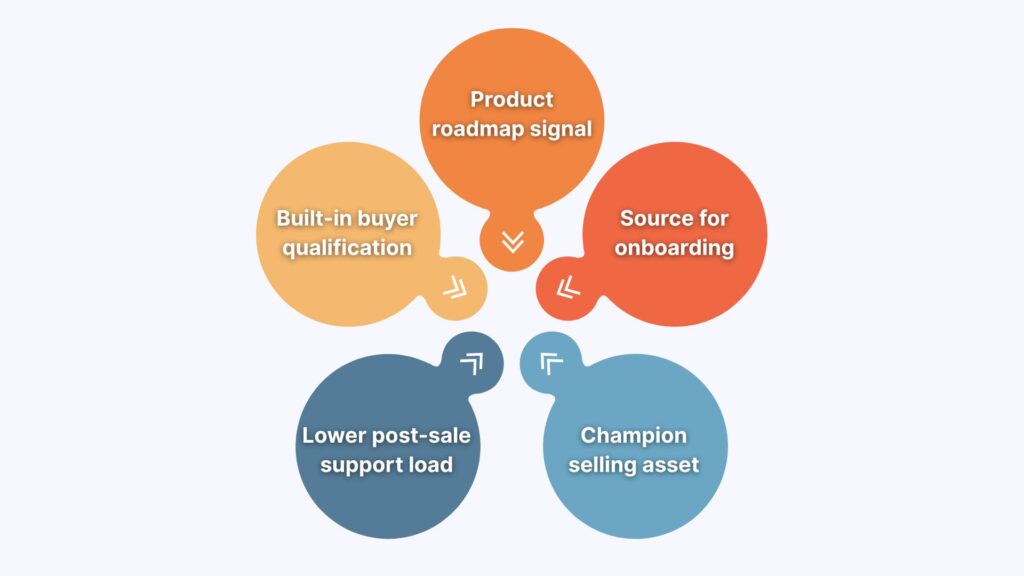
Most teams measure a sales demo by one outcome: did the prospect move to the next stage? That single metric misses five side effects that compound across the entire organization: product roadmap data, ready-made onboarding material, built-in buyer qualification, internal champion content, and a lower post-sale support load.
I suggest that we discuss each one in more detail:
- Product roadmap signal: Discovery-led demos return feature requests tied to specific buyer workflows, which gives the product team high-quality input.
- Source for onboarding documentation: Recorded demos become training content for new sales representatives, replacing written guides with past conversations and client objections.
- Built-in buyer qualification: A single demo conversation reveals budget, urgency, authority, and fit, which removes the need for a separate qualification step.
- Champion selling asset: A shared recording or guest link lets the champion present the product to stakeholders who missed the call, removing the need for a second demo.
- Lower post-sale support load: Buyers who see exactly how the product works during the demo log fewer support tickets after signing, because the demo doubles as a first training session.
What Are the Sales Demo Best Practices?
The best practices for sales demos are simple: understand the prospect’s goals before presenting, tailor the demo to their workflow, lead with outcomes, answer questions honestly, and make the next step easy. While these principles sound straightforward, they are often overlooked in favor of feature-heavy presentations that leave buyers overwhelmed.
The eight practices below are the habits I saw most consistently across successful demos and the ones Jackie repeats on her calls.
1. Base the Demo on the Prospect’s Use Case
Before you share your screen, ask the prospect for two or three workflows they want the product to handle. Then build the demo around those workflows and skip everything else.
When the demo opens with discovery, the conversation stays in the buyer’s world for the first few minutes. The seller collects the material needed to make every feature feel relevant, and the buyer gets a preview of what their week looks like with the product in it.
Jackie describes her routine the same way every time.
Her approach keeps the buyer talking early. The longer the buyer talks, the more material the seller has to tailor the rest.
Here is the discovery sequence that Jackie follows across her calls:
- Pain points first: Ask for use cases and goals before sharing your screen.
- Tech stack second: Confirm which communication tools or CRMs the prospect uses.
- Mapped features third: Show only the capabilities that answer the stated use cases.
- Relevance check fourth: Pause after each feature and ask if it fits their work.
- Low-pressure last: Offer a trial or next step that the prospect controls.
The tech stack question in step two deserves its own practice, because the answer changes the entire demo path.
2. Map the Prospect’s Current Workflow Before Showing Yours
Ask the prospect which business tools, processes, and platforms they use today before you show a single feature. The answer determines which integration paths to highlight, which workflows to walk through, and which part of the product to open first.
When you skip this question, you risk showing a workflow the prospect cannot use. That ten-second question saves ten minutes of irrelevant screens, and the information you collect shapes every feature you show for the rest of the call.
Jackie sums up his rule in one line:
Surely, the specific question changes depending on the product, but the habit is the same: learn how the prospect works before you show them how they could work. Once the product appears inside their existing environment, every feature feels closer to their daily routine. From there, the next question is what to show inside it.
3. Lead with the Deliverable
Show the finished output the product creates before you explain how it is made. When a salesperson opens with the deliverable, the prospect sees the end result first, and curiosity about how it was built follows on its own.
This order works because desire precedes trust. A prospect who sees a polished proposal (or any other output your product creates) wants it before they care about the engine behind it. Show the tour first, and you risk 20 minutes of feature-by-feature clicking before the buyer sees a single reason to care.
Jackie puts the order plainly:
Once the prospect sees the value, the next question is predictable: “How are you different from the other tools that promise this?”
4. Answer Competitor Questions with History and Honesty
When a prospect asks “how are you different,” talk about your own track record: how long you have been in the market, what you have built, and what your customers taught you that changed the product. Let the prospect draw their own conclusion about depth and credibility.
The B2B software market is crowded, and prospects know it. They expect you to do your homework, research their needs, and analyze competitors with AI or manually. The best move is to explain where you came from, how you are different, and then admit what you do not know or have in terms of functionality.
The combination of evidence and humility cuts through the noise of confident claims the prospect hears everywhere else.
Jackie has a fixed way of answering it:
Prospects hear dozens of confident claims per week. A single honest admission makes every other “yes” on the call more believable.
Honesty also sets up the most underused asset in the demo: the AI that prepared you for the call.
5. Use AI to Optimize Pre- and Post-Demo Workflows
With agentic solutions like Sembly, you can point AI at the recorded demo and ask for a follow-up email, a proposal draft, and the answers to every open question. It’s no secret that the follow-up stage is where most deals slow down, because the seller is busy with the next call, and the prospect goes cold while waiting for a recap. However, a recorded demo removes that delay by turning the conversation into source material the AI already has.
The same engine also solves an internal problem: onboarding new salespeople. This way, a sales team can feed recorded demos into the cross-meeting AI and generate a Q&A document that covers objections, positioning, and the questions that buyers ask most.
Jackie uses the recorded calls twice over:
Speed is the point. Besides, no one enjoys the wait, so why make prospects wait for something that can only take minutes?

7. Answer Roadmap Questions with Timelines You Can Verify
Separate what exists from what is planned, and be specific about the difference. “That’s coming soon” is vague and earns no trust. “That is in development, and I expect it by the end of the quarter, but let me confirm the exact timeline with our product development team” is useful. The prospect hears progress, honesty, and a follow-up commitment in one sentence.
The instinct to promise everything is the fastest way to lose a renewal later. A demo promise that slips by two quarters becomes a reason to churn, because the buyer remembers exactly when you said it and exactly how confident you sounded.
Jackie refuses to promise what is not shipped:
The same honesty applies to security questions. When a prospect asks how their data is handled, point them to the GDPR or SOC 2 Type 2 documentation, for example, instead of improvising an answer from memory.
8. Close by Handing the Prospect Control
Offer a next step the prospect controls: a trial they can extend or a discount they can lock in without making a final decision. A demo close works when the buyer feels like they chose the next step. A forced close leads to a signed trial and a cancelled subscription. When the buyer enters on their own terms, the trial converts.
Here is how Jackie approaches this demo stage:
The close is the result of seven habits done in order. Think about it this way: discovery gave Jackie the use cases --> the tech stack shaped the demo path --> the deliverable created desire --> honesty about competitors and security built trust --> AI handled the prep and the follow-up.
By the time the close arrives, the prospect already knows how the product fits into their week. The only question left is when to start.
What Is the Role of AI in Sales Demo Calls?
AI handles three jobs around the sales demo: research before the call, documentation after it, and coaching between calls. I like to think of it this way: the salesperson owns the live conversation, while AI owns everything else.
If you are still unsure when to bring AI in and when to keep it out, the next two sections cover both sides.
When Should You Use AI for Sales Demo Calls?
AI earns its place at three stages of the sales call process, all of them outside the live conversation:
- Pre-call briefing: AI can compile past meeting data, CRM records, and public information about the prospect into a single briefing document.
- Post-call documentation: AI can generate a call summary, draft a follow-up email, or a proposal from the recorded conversation. Native integrations can route meeting data to CRMs or other tools the team uses.
- Cross-call coaching: Call recording paired with transcription features lets managers review talk-to-listen ratio, speaker separation, and engagement patterns across every recorded demo.
Those three stages are examples of great AI use cases. The next set of moments is where AI can negatively affect the deal if you lean on it too hard.
When Should You Not Use AI for Sales Demo Calls?
As with any other solution, AI has limits during the live demo. Here are the three moments where the human has to lead:
- Live discovery: The salesperson reads the prospect’s tone, adjusts the demo path, and decides when to push forward or pause, which AI cannot do.
- Roadmap and security questions: These moments require honesty, specific timelines, and a personal commitment to follow up, which a generated response cannot deliver.
- Relationship decisions: When to extend a trial, when to bring in a technical expert, and when to let the buyer think all depend on reading the room.
Surely, you can still find AI use cases for discovery calls or security discussions; however, the human has to lead all of these touchpoints and use AI as a helper, rather than depend on it completely.
What Are the Early Signs of Ineffective Sales Demo Calls?
Even with AI in the right places, demos still go wrong, and while it’s never something you expect, it just happens. What’s important is to identify the signs early and resolve them before they have a serious impact on your sales results.
This section covers the four earliest warning signs:
- Prospect silence: When the prospect stops asking questions and the call becomes a one-voice monologue, the buyer has likely disengaged.
- Skewed talk-to-listen ratio: If the salesperson talks for more than 65-70% of the call, the demo likely has become a presentation, and the buyer has stopped participating.
- Feature-dumping: When the seller shows every product feature instead of the three to five that match the buyer’s use cases, the prospect often leaves with a blurry impression.
- Dead trial: A trial that expires with zero logins means the demo created neither urgency nor clarity for the buyer to take the next step.
Each of these signs points back to the same root cause: the demo was built around the product instead of the buyer. Fortunately, by this point, you should know how to deal with ineffective calls and what practices can turn the tables for your business.
Wrapping Up
The best sales demos work like guided conversations. The seller shows less, asks more, and tells the truth about what the product can and cannot do. Every habit in this guide came from watching my own team run that play on recorded calls.
The thread running through all eight habits is restraint. Skip the monologue, show one stack, one deliverable, one honest answer at a time. The product that wins the demo is the one the prospect can picture in their own week by the time the call ends. This is how you know your sales demos are a success.
FAQ
How long should a sales demo be?
Most effective sales demos run 30 to 45 minutes, with discovery in the first few minutes and a short product walkthrough.
What makes a good sales demo?
A good sales demo opens with discovery, shows only features that match the prospect’s use cases, and ends with a clear next step. It feels like a conversation where the salesperson confirms whether each feature applies to the prospect’s work before moving on.
How do you structure a sales demo?
Structure a sales demo in five stages: discovery, tech stack confirmation, mapped feature walkthrough, relevance checks, and a low-pressure close.
Discovery defines what to show, and the tech stack defines which version to show. The close gives the prospect control of the next step.
What questions should you ask before a sales demo?
Ask about the prospect’s main pain points, their current process, their team size, and the tools they use.
These answers help determine which features to show and which version of the product fits.
How do you start a sales demo?
Start a sales demo with discovery questions about the prospect’s goals, pain points, and current process. Avoid sharing your screen until you know what the prospect wants to achieve.
This lets the salesperson show only the features that matter to that buyer.
How many features should you show in a sales demo?
Show three to five features that map to the prospect’s stated use cases. A full-feature tour often overwhelms buyers and dilutes the capabilities that matter.
Restraint signals that the salesperson understands the prospect’s specific needs.
What should you not do in a sales demo?
Do not run a full product tour, talk for long stretches without questions, or attack competitors. Avoid promising features that do not exist yet. Showing every feature overwhelms the buyer and buries the capabilities that matter to them.
What is the difference between a sales demo and a product demo?
A sales demo targets a specific prospect to move a deal forward, while a product demo can be a general overview for any audience.
Sales demos are tailored to a buyer’s pain points and goals. Product demos often show the full feature set without that focus.
What is the difference between a live demo and an interactive demo?
A live demo is run in real time by a salesperson, while an interactive demo lets the prospect explore the product on their own. Interactive demos suit early research, and live demos suit high-value deals that need tailoring.
Many teams use both across the funnel.
