

Table of Contents
ToggleOver the years, I’ve seen dozens of consulting reports. The analysis is usually solid: the industry research, competitor analysis, and SWOT analysis are all there. The writing, on the other hand, is often not that convincing. However, I am hoping to change this.
In this guide, I’ll break down how to write a consulting report that is structured and persuasive. We’ll also go through definitions and talk about how AI tools for consultants can help you automate documentation.
Let’s get started.
What Is a Consulting Report?
A consulting report is a formal document a consultant creates for a client to communicate findings, analysis, and strategic recommendations. In simple terms, it takes all the research and business mapping you’ve done and turns it into something a person can read, understand, and act on.
The way I think about it: your client hired you because they have a problem they can’t solve on their own. The consulting report is how you hand that solution back to them in a form they can use. It documents the problem you were asked to investigate, your methodology, and, most importantly, what they should do about it.
What Are the Different Types of Consulting Reports?
In practice, consulting reports vary a lot depending on the type of engagement. For example:
- Strategic consulting report: It is the most common type at large companies and addresses high-level business questions. The audience is almost always senior leadership or board level.
- Operational consulting report: This one is focused on process inefficiencies, organizational structure, supply chain gaps, and cost reduction opportunities.
- Financial consulting report: This type covers financial health, valuation, investment decisions, or M&A due diligence, and requires a high level of precision. Numbers need to be verified, sourced, and presented with enough context.
- IT and technology consulting report: This report type assesses technology infrastructure, digital transformation readiness, software selection, or cybersecurity posture.
- HR and organizational consulting report: This example covers workforce planning, culture assessments, compensation benchmarking, or organizational redesign. Findings are often sensitive and require careful framing.
- Compliance and risk consulting report: This type usually documents regulatory exposure, risk assessments, or audit findings and follows stricter formatting conventions than other report types.
As you can see, the format changes, yes, but the purpose stays the same: give your client the clearest possible picture of where they are, where they should go, and why.
What Are the Challenges in Writing Consulting Reports?
The honest answer is that most consultants are trained to think, but they aren’t great writers. I mean, the skills that make you a great analyst don’t automatically make you a great communicator, and that’s okay, as long as you have some AI teammates or tools backing you (we’ll get back to that topic later).
Anyway, here’s where I’ve seen things go wrong most often, including in my own work early on:
- You write to impress instead of to explain: It’s easy to default to tech-heavy language, but I’ve watched clients feel like outsiders after reading such reports. Needless to say, that’s not how you win people over.
- The recommendation gets lost: Consultants are taught to build an argument before landing a conclusion. However, clients don’t read reports like essays. By the time they get to the recommendation on page 18, half of them have already left the document.
- Your structure only makes sense to you: Without a clear framework, such as the MECE technique, key points often get repeated, and the reader loses the thread.
- The report answers questions nobody asked: This one took me a while to notice. I’d dedicated pages to context and methodology to show my expertise, but the client simply wanted to know what to do.
- A vague executive summary: Early in my career, I treated it like an introduction. I’d set up context, explain the background, ease the reader in. However, a strong executive summary tells the client what problem you were solving, what you found, and what you recommend in one page. A prolonged introduction often ends up being your own enemy.
The good news is that none of these come down to talent or experience alone. Most of them depend on the structure, and once you have that, everything else gets easier.
Let’s walk through how to put a consulting report section by section.
How Do You Create an Effective Consulting Report?
There’s no single consulting report format that works for every situation. However, after years of writing these documents (and reading far too many that didn’t quite work), I keep coming back to the same structure.
Here’s how I put one together.
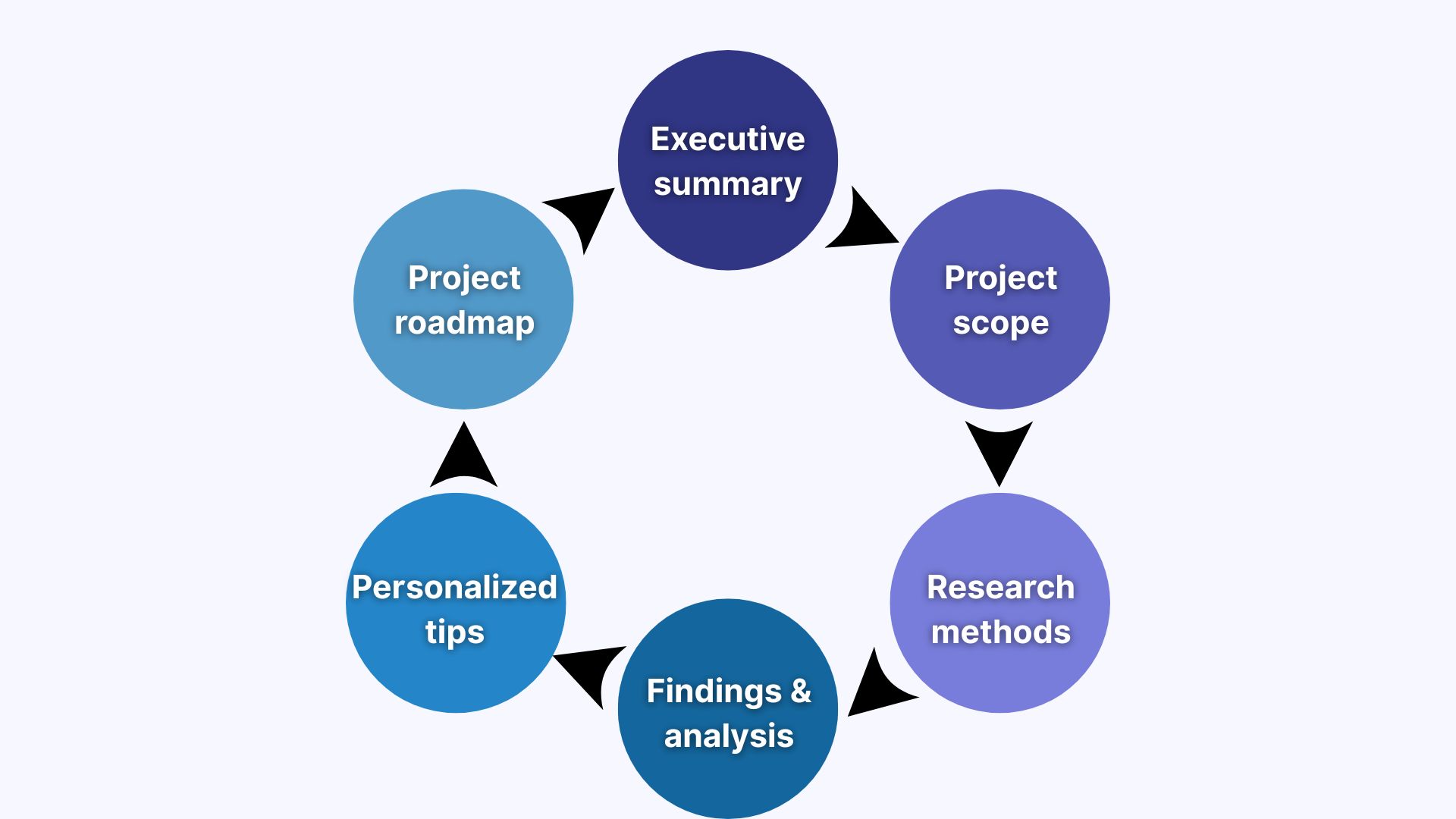
1. Write an Executive Summary
I write this last every time, without exception, although technically, it’s the first thing you see. The reason is simple: I don’t know exactly what I’m summarizing until the rest of the report is done. Trying to write the executive summary first means I end up revising it 3 times as the document changes.
Once everything else is in place, I sit down and distill the report into one page. That’s it. If a senior stakeholder picked up my report with 5 minutes to spare, this section should be enough to understand the situation and know what I’m recommending.
2. Add Background Information and Project Scope
This is where I establish shared understanding and customize my report templates. Before I start telling the client what I think they should do, I want them to see that I genuinely understand their situation. Getting this section right matters more than it might seem. A vague scope leads to vague analysis, and when clients feel like a report wasn’t written with their specific context in mind, they trust the recommendations less (regardless of how solid the underlying work is).
3. Mention Research Methods and Approach
Here, I explain how I arrived at my findings. You can ask yourself: What research methods did I use? Did I conduct a client needs analysis? Apply data science models or use scenario analysis to test assumptions? I walk through my process in enough detail that the client understands the conclusions didn’t come from guesswork, but not in so much detail that this section becomes a distraction.
Think of it this way: this section is about credibility. It’s where I earn the right to make recommendations in the sections that follow.
4. Clarify the Findings and Analysis
This is the core of the report, and it’s where the MECE technique earns its keep. I organize my findings so that each insight has exactly one place in the document. It takes more planning upfront, but the result is a report that reads well from start to finish.
I bring in everything relevant here to clarify the findings: analytics dashboards, decision tree diagrams, and comparison charts. If a visual communicates something better than text would, I use it. Overall, my recommendation here is to try report makers, design tools, and anything to make information easy to digest.
5. Add Recommendations
I lead with my strongest recommendation. From there, I connect each recommendation to a finding from the previous section to help the client trace a line from what I found to what I’m suggesting.
What I’ve found over the years is that the recommendations section also needs to be honest about uncertainty. Ask yourself: What are the risks? What happens if the client waits 6 months before acting? Reports that acknowledge the complexity of a situation tend to get taken more seriously than reports that oversimplify it.
6. End with an Implementation Roadmap
Lastly, a recommendation without a path forward is just a suggestion. In this section, I usually lay out what actually needs to happen: in what order, involving which people or teams, and on what kind of timeline. It doesn’t have to be a detailed project plan. However, even a high-level phased approach gives the client something to work with and makes the report feel grounded in reality.
Can You Automate a Consulting Report?
Yes, and you should at least try to. For me, the most time-consuming part of writing a consulting report has never been the thinking. Usually, it’s everything that comes after: taking notes, drafting recaps, then sitting down to turn all of that into a shareable document. It takes hours!
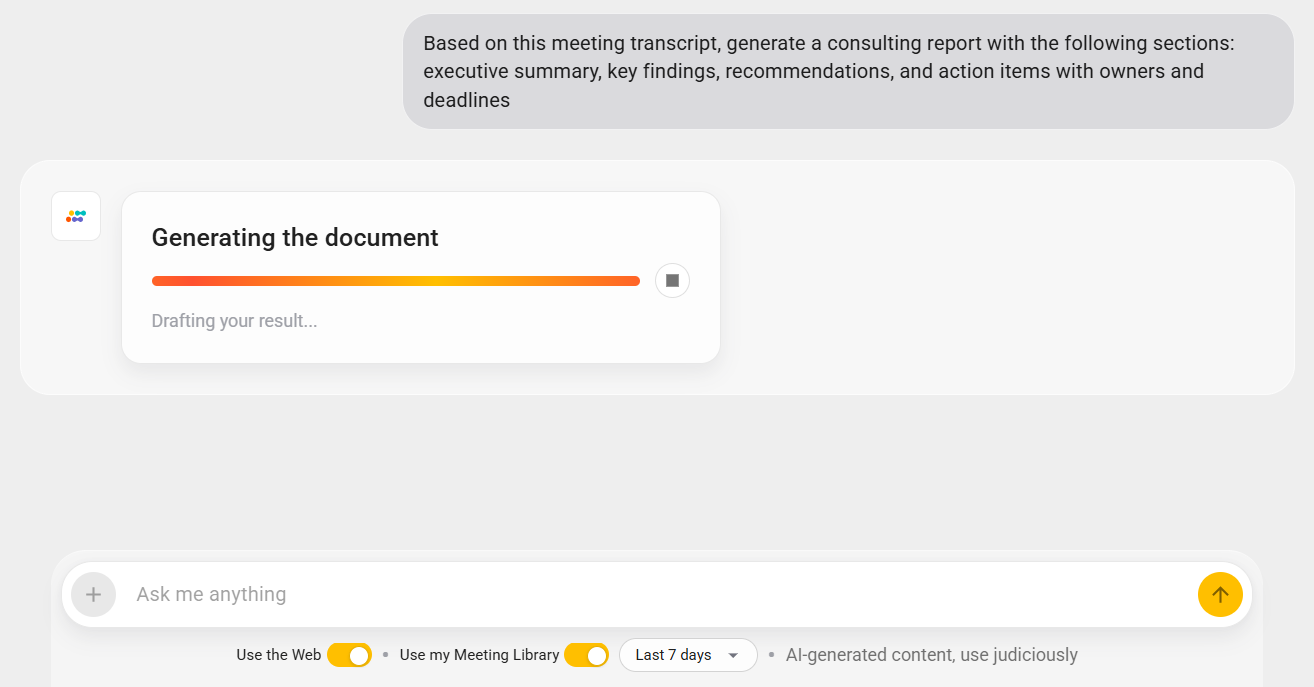
That’s exactly the problem Sembly AI solves. What I find genuinely useful about it is that it understands the context. After a client conversation, Sembly can automatically generate a report draft based on what was discussed. The key findings, the decisions, and the action items are already structured and ready for you to refine.
Here is how you can do it:
- Expand the Semblian section in the side menu.
- Click “+” to start a new chat.
- Ask Sembly, “Based on this meeting transcript, generate a consulting report with the following sections: executive summary, key findings, recommendations, and action items with owners and deadlines.”
- Done!
What Does a Good Consulting Report Look Like?
This is the question I’d most want answered when I was learning to write consulting reports. So here’s what separates a report that changes decisions from one that gets forgotten.
- A comprehensive executive summary: A strong executive summary opens with the important findings, provides supporting logic, and closes with the next steps for the client. It should be possible to make a decision based on the executive summary alone.
- Specific recommendations: Every recommendation should have four components: what to do, who should own it, by when, and what success looks like.
- Narrative supported by data: The reports I’ve seen clients read are the ones where every chart and table has a one-sentence headline above it that tells the reader what to conclude from it. If a reader can skip the chart and understand the point from the headline alone, the report is well written.
- Informative appendices: Strong consulting reports keep the body tight (up to 10 to 15 pages) and push detailed data, methodology notes, and supporting analysis into appendices. Senior stakeholders may not have time to read through all the details.
I think you may have traced my idea already: a strong consulting report has to be precise. Think of it as a document where each word earns its place and extra details are moved to the background (like appendices). This way, your client focuses on the important points, and you have more chances of closing the deal, whether or not you use AI to automate the document.
What is the Reality of AI in Consulting?
There’s a lot of noise about AI taking on most tasks and essentially replacing consultants. However, I don’t think that’s the right way to look at it.
What the research actually shows is that AI is changing how consulting work gets done, and the numbers back this up pretty clearly.
Here are some statistics on AI adoption in consulting:
- 88% of organizations regularly use AI in at least one business function, up from 78% just a year ago (McKinsey).
- 39% of organizations are already experimenting with AI agents (McKinsey).
- Nearly 2/3 of organizations have even started scaling agentic AI across the enterprise (McKinsey).
Now, here are some statistics on what AI adoption means for people:
- Industries most exposed to AI are seeing 3x higher revenue growth per employee compared to those least exposed (PwC).
- Wages in AI-exposed industries are growing 2x faster than in others (PwC).
- Workers with AI skills now command a 56% wage premium over colleagues in the same role without them (PwC).
- The skills required in AI-exposed jobs are changing 66% faster than in other roles, which is more than twice as fast as last year (PwC).
Writing a consulting report is a perfect example of where this plays out in practice. The content, the formatting, the first draft pulled from a client meeting, tools like Sembly can handle that. The analysis, the advice, and the read on what a customer needs to hear still have to come from you.
Wrapping Up
The quality of the consulting report often determines how the consulting work is perceived. Clear report design, evidence-based recommendations, and thoughtful use of tools make complex findings easier to evaluate. When the report reflects structured thinking and sound judgment, it supports stronger decisions, better implementation, and higher client satisfaction.
Throughout this guide, we’ve covered what a consulting report is, how to structure it, as well as how AI tools can automate the process. I hope from now on you will navigate this topic with confidence. Good luck!
FAQ
What does a consulting report look like?
A consulting report can be delivered as a written document or as a structured PowerPoint presentation. It typically includes an executive summary, background information, methodology, analysis, recommendations, and supporting data in appendices or dashboards.
The format depends on the client and project scope, but the structure should always be logical and decision-focused.
What should be included in a consulting report?
A professional consulting report should include:
- A concise executive summary
- Project objectives and scope
- Description of research methods
- Data-driven analysis
- Strategic recommendations
- Implementation considerations
- Supporting visuals such as dashboard templates or decision tree diagrams
Overall, each section should support the final recommendation.
What is the standard consulting report format?
There is no universal template, but most professional consulting reports follow one of two formats: a structured written document or an executive slide deck. A written consulting report typically includes a title page, a concise executive summary, client background and objectives, scope of work, research methods, analysis, findings, recommendations, implementation considerations, and supporting appendices.
In corporate and management consulting environments, the consulting report is often delivered as a PowerPoint presentation. In this case, the structure moves from executive summary and problem definition to analytical framework, key insights, options, financial impact, and implementation roadmap.
How long should a consulting report be?
It depends on the scope of the engagement, but there are some general rules. For example, the executive summary should never exceed 1 page, and the full report should be around 20-30 pages for most consulting projects.
What is the difference between an executive summary and an introduction in a consulting report?
The introduction explains what the report covers, why the engagement was undertaken, and how the research was conducted. The executive summary is a complete picture of the entire report, including the problem, the key findings, and the recommendations.
How do you use the MECE principle in a consulting report?
MECE stands for Mutually Exclusive, Collectively Exhaustive. It is a framework developed at McKinsey for structuring analysis and recommendations. Mutually exclusive means each point, category, or recommendation covers distinct territory with no duplication. Collectively exhaustive means the full set of points covers the entire problem space.
In a consulting report, MECE applies most to how you structure your findings and recommendations. If two findings overlap, merge them. If your recommendations don’t fully address the problem, something is likely missing.
How do you handle client feedback on a consulting report?
Separate feedback into two categories: factual corrections and opinion disagreements.
- Factual corrections: These include wrong data, misquoted figures, or inaccurate context and should be addressed immediately.
- Opinion disagreements: When the client doesn’t like a recommendation, disputes an interpretation, or pushes back on a conclusion.
You need to acknowledge the disagreement, understand the specific concern, and then either explain the reasoning or try to approach differently if the client has information you didn’t have access to.
- Multi-meeting chats
- AI Insights
- AI Artifacts

You might also like
