
Table of Contents
ToggleIf you’ve ever worked on a project, you know that many problems share a common beginning: someone asks for “a small change.” It sounds harmless, but I’ve learned the hard way that this is often the moment right before the disaster, and I’m not even being dramatic. Sometimes, the change is so “minor” that no one even remembers the before. I’ve seen teams argue over decisions that were never written down, and project managers blamed for workstream changes they never approved. That’s exactly why change requests exist.
In this article, I’ll walk through the definition of a change request in project management. I’ll also explain how to create and automate one and show you how to keep it from becoming a problem. Sounds like a plan? Then, let’s get started!
What Is a Change Request in Project Management?
A change request in project management is a formal way to request updates to an approved project plan. In simple terms, it documents what you need to change, why, and how it will affect the project. I think of it as the line between a controlled flow and one that slowly becomes rather chaotic.
From my experience, a project change request protects everyone involved and is never extra. It provides the project team with a foundation for decision-making and gives stakeholders visibility into trade-offs. Regardless of what the document affects, it creates a shared reference point and, as a result, smooths changes over.
What Are the Components of a Project Change Request?
Personally, when I review a project change request, I’m not looking for long descriptions. Instead, I need a short explanation that answers basic questions and helps me understand what happens next.
I’ve found that most effective change request forms follow the same structure, which works for all formats: Word documents, Excel sheets, or project management software. Usually, it includes 7 components:
- General information: A project name, change request ID, requestor name, and submission date.
- Change description: The affected project deliverables, requirements, documents, or systems.
- Reason: An outlined reason for the project change. It can be a client request, new requirements, regulatory updates, or technical constraints.
- Change impact evaluation: An explanation of how the change affects project scope, schedule, cost, resources, and quality.
- Risk analysis: Potential risks or negative consequences introduced by the change request.
- Priority level: An indication of urgency (high, medium, or low). This will help your team decide how quickly the change must be addressed.
- Approval section: A defined space for project stakeholders or change authorities to approve, reject, or defer the request.
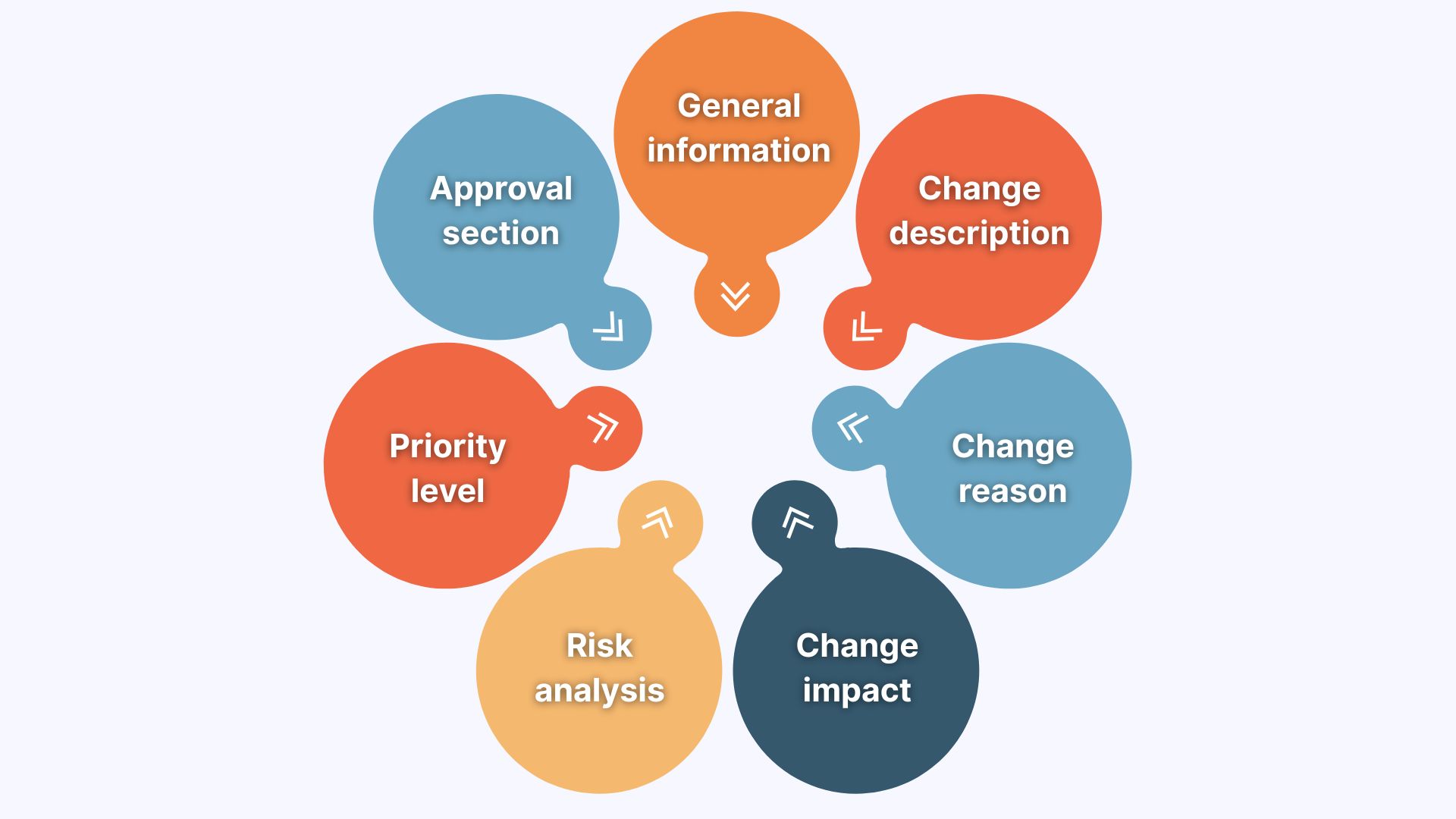
When these components are captured consistently, the project change request process becomes faster. Besides, everything important is already there, so there’s no need to double-check the details and make the process longer than it should be.
How Do You Write a Project Change Request?
Now that we have discussed the components, let’s move on to discuss how you can build a project change request. Below, you will find 6 steps, each connected to previously outlined components of the document. I have structured them this way to gradually guide you through the process and ensure we cover everything we have discussed.
Just remember that a good change request lets stakeholders say yes or no with confidence, knowing exactly what they’re trading off. When this is done right, change requests bring value to both the team and the requester.
Identify the Change
The first step is to define what needs to change. Document the exact scope of the modification, be it a deliverable, timeline, budget, or resource allocation. Include reference numbers, work breakdown structure codes, or sprint identifiers to pinpoint the affected project elements. Be explicit about what will remain unchanged to prevent scope creep and maintain boundaries around the request.
Tip: Link your change request to specific project artifacts. Attach the original requirements document, design specs, or contract clause numbers.
Explain the Reason for the Change
Next, provide the reason for this change, and ensure to distinguish between internal oversights and external factors. Explain why moving further without this change poses greater risks than implementing it. To prove your point, I recommend using risk matrices or issue logs as supporting evidence.
Additionally, you may connect the change to strategic objectives or business value to present it as a necessary decision (and not just someone’s wish).
Quantify the Business Impact
Then, explain how this change influences the project in concrete terms. Outline its impact on timelines, budget, scope, and business processes using numbers (if possible). Include estimates such as working days, cost changes, or extra effort in hours, and briefly note how you calculated those values.
I also recommend mentioning any follow-on effects that could later appear in dependent tasks or future phases of the project.
Tip: You can use a simple “current state vs. proposed state” table across time, cost, and scope. From my experience, this can help you speed up the approval process.
Define Resource and Timeline Requirements
Once you are done with the impact, specify exactly what’s needed to implement this change. For example, it can be additional budget, extended deadlines, extra personnel, or software licenses. Break down costs into labor, materials, and overhead categories (your finance department will thank you for this). Also, consider identifying which team members will be affected and include buffer time for realistic planning.
As a side note, you may have noticed that this step is closely linked to the previous one, but while the former focuses on what is affected, this one outlines what you need.
Set Up Approval Workflow and Dependencies
The last step is to map out who needs to review and authorize this change. Identify the sequence of approvals required: leadership team, project sponsors, or client stakeholders. Highlight any blocking dependencies and set a realistic deadline for the decision-making process that accounts for stakeholder availability and meeting cycles.
Tip: Include a “decision by” date with explicit consequences. This will decrease the likelihood of missed deadlines and negative client experience.
Can You Automate a Project Change Request?
Yes, and if you are looking for a smart meeting AI to automate project change requests, you are in the right place.
Normally, when you write a change request, you use information from the meeting: the decision, the reason, the objections, and the timeline concerns. Pretty much everything you need is likely inside the conversation. However, it takes time to review meeting transcripts and notes, and try to remember who’s responsible.
With Sembly AI, you don’t start from scratch. I don’t.
It records and transcribes project meetings, extracts tasks with owners, descriptions, and deadlines, as well as analyzes conversations and generates deliverables. As you may have guessed, a change request is one of those documents you can draft with Sembly AI.
Here are the steps you need to take:
- Log in to your Sembly AI account.
- Expand the Semblian 2.0 section.
- Click on “+” icon to create a new chat.
- Ask Sembly, “Generate a project change request based on this meeting transcript. Extract the change description, requester, reason, impact on scope, discussed risks, and any proposed implementation approach.”
- Done!
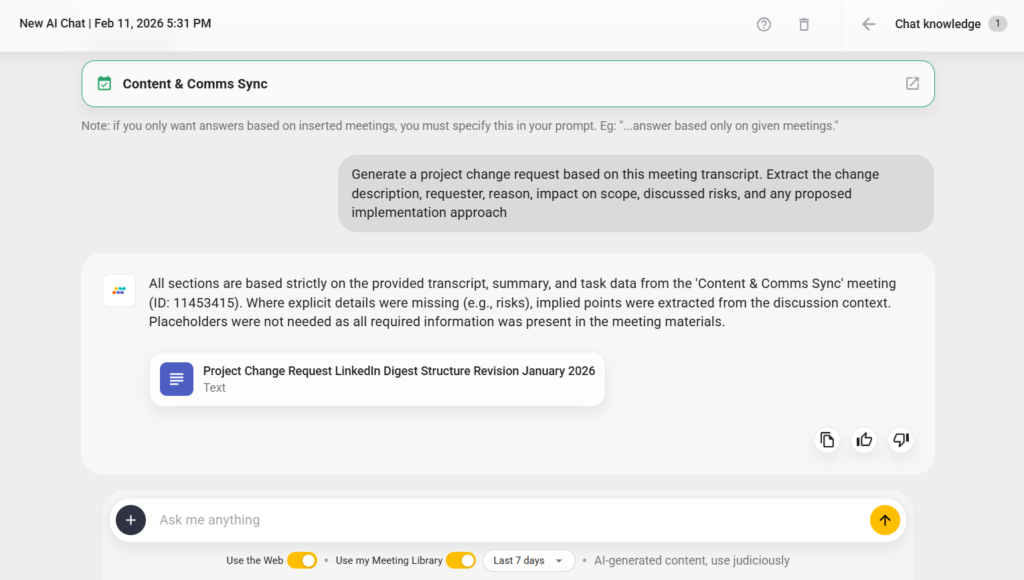
The good thing is that Sembly AI is one of the AI note-takers that support in-person meetings the same way they do online ones. Even if you are “team office”, Sembly AI will capture conversations and help you draft a professional request for change.
What Are the Best Practices for Maintaining a Project Change Request?
One of the most common reasons some change requests fail is that no one manages them after approvals. The document can be crystal clear with a well-calculated impact, and still disappear into a folder while the project continues to move.
From my experience, in a structured change management process, discipline after approval matters just as much as documentation before it. This is why I’d like to dedicate the best practices to what happens after.
Here are some of the tips that ensure updates actually help IT projects once the approval stage is over:
- Lock the approved version: Lock the original submission once it enters review. If updates are required, track revisions formally. In regulated IT service management environments, undocumented edits can invalidate approval history (best to avoid this!).
- Audit implementation: Compare the implemented outcome against the original change description line by line. Confirm that the change scope matches the approved one.
- Monitor pattern-based change behavior: Review your change request log for behavioral patterns. Do unclear requirements trigger most changes? Poor client needs analysis? Internal estimation gaps?
- Track change against the project phase: Measure how many change requests occur during different phases. For example, a spike during late stages often results from requirement instability or weak scope definition.
When each request is traceable, linked to execution, and verified after delivery, the change management process becomes predictable. Yes, projects still evolve, but the evolution itself is controlled and documented, and that’s what matters most.
Wrapping Up
I’ve noticed that the way a team handles change says a lot about its maturity. I mean, planning is theoretical, but the change is real. It tests whether you record important decisions, understand trade-offs, and whether commitments mean something.
An effective project change request helps protect alignment. When documentation is solid, and automation helps capture what was said in meetings, I spend less time trying to remember the details and more time leading the project.
I hope this article has helped you figure the project change request out. Good luck with your next project!
FAQ
What is a change request in project management?
A change request is a formal document used to propose modifications to an approved project plan. It records the changes, their reasoning, and how they affect scope, schedule, cost, and risk.
The request must be reviewed and approved before implementation to maintain change control and protect the original scope of work.
What are the main types of change requests?
The 4 common types of change requests are:
- Minor changes: Small adjustments with limited impact on cost, schedule, or deliverables.
- Standard changes: Pre-approved, low-risk changes that follow a defined procedure and do not require case-by-case evaluation.
- Major changes: Significant modifications that affect project scope, budget, timeline, or contractual commitments.
- Emergency changes: Urgent modifications required to prevent serious disruption, system failure, compliance risk, or financial loss.
What is included in a project change request form?
A project change request form includes the following:
- general information
- description of the proposed change
- reason for the change
- impact analysis
- risk assessment
- proposed implementation approach
- approval section
What is the difference between change management and change control?
Change Control refers to the structured process for reviewing, evaluating, approving, or rejecting individual change requests.
Change Management is the broader governance framework that defines how changes are identified, assessed, implemented, monitored, and documented throughout the project lifecycle.
When should you submit a change request?
A change request should be submitted as soon as a deviation from the approved project plan or baseline is identified. This may include new client requirements, scope changes, technical constraints, regulatory updates, or schedule adjustments.
Work related to the proposed change should not begin until formal approval is granted through the defined change control process.
- Multi-meeting chats
- AI Insights
- AI Artifacts

You might also like
