
Table of Contents
ToggleHave you ever watched a project fail, although the team documented the risks? It feels like teammates have done everything right, yet still, something was missing. So, what can be the reason? Effective risk management only works when you understand the full context, including human behavior and the cultural dynamics (ISO 31000). When context is missing, risks appear smaller than they are, and the likelihood gets misjudged. That’s why many risk matrices fail: they’re treated as visualizations rather than tools. Fortunately, starting from today, they won’t.
In this article, we will discuss what a risk assessment matrix is, how to choose the right structure, and avoid common mistakes. We’ll also review examples and templates and learn how tools like Sembly automate the process. Shall we get started?
What Is a Risk Assessment Matrix?
A risk assessment matrix is a tool used to evaluate and rank risks by comparing two factors: the likelihood of a threat occurring and the severity of its impact. It visualizes these two aspects as a risk level, helping teams understand which threats are low, medium, or high priority and act before issues escalate.
Example: A product team postpones a third-party API key update, which is set to expire in 30 days. While it may feel low risk, when you assess it as 4 (likely) and 4 (major impact) in a 5×5 matrix, it reaches a 16 (high risk).
The Types of Risk Assessment Matrices
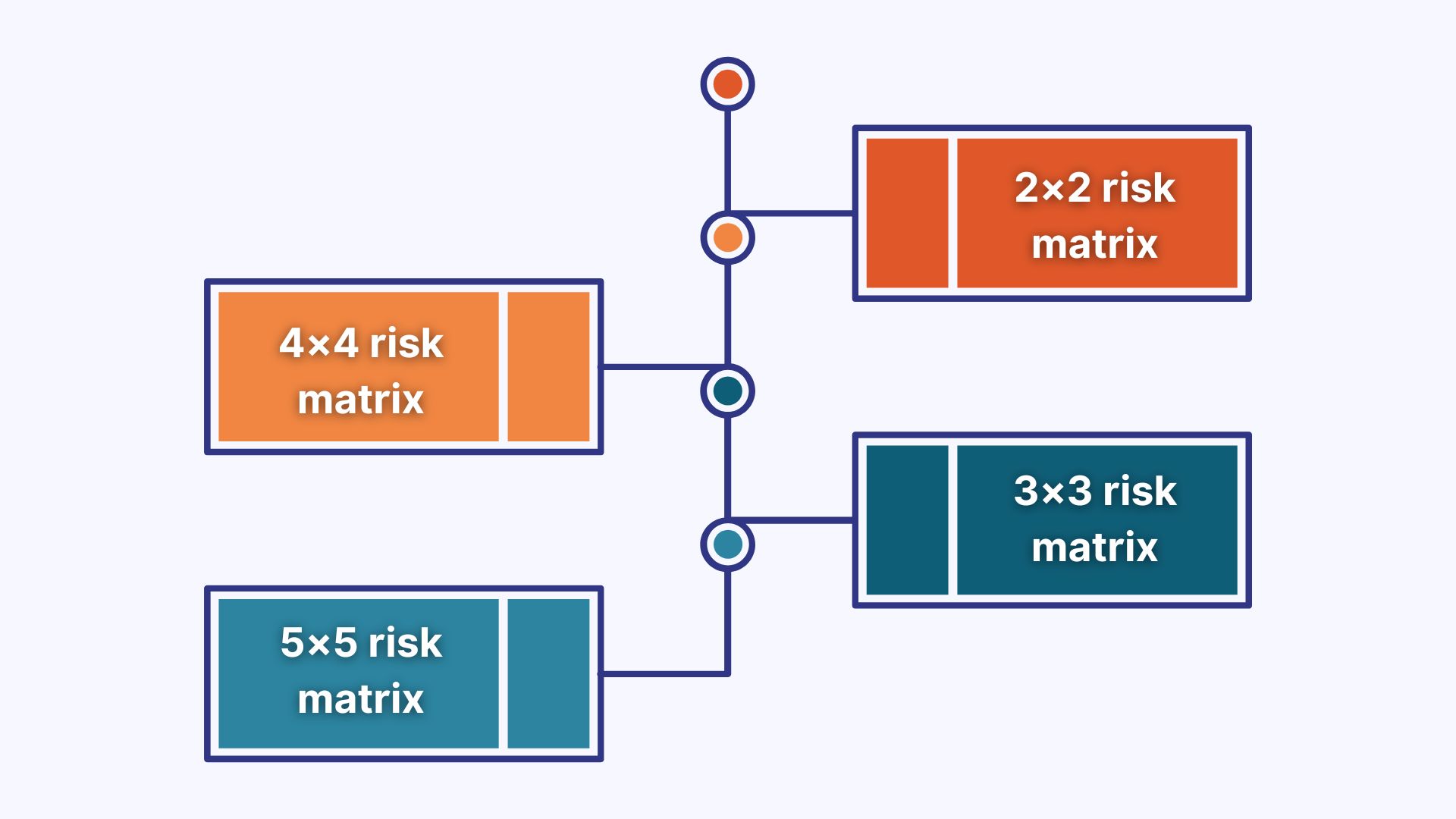
There are 4 main types of risk matrices in project management: 2×2, 3×3, 4×4, and 5×5. The choice usually depends on how much detail you need when scoring threats. The more cells the matrix has, the more complex your risk evaluation is. The key? Prioritize the version that aligns with your team’s risk culture, decision-making style, and project complexity.
I suggest that we briefly review how these types differ from one another:
- 2×2 risk matrix: This option is best when you need to distinguish between low and high risk. It is perfect for quick vendor assessments or early-stage project planning.
- 3×3 risk matrix: This variant provides more space for likelihood and impact, making it easier to flag moderate risks. It is used for internal processes or when risks tend to cluster around “medium.”
- 4×4 risk matrix: This type offers more precision and is best for IT or operational environments where even a minor change can significantly impact risk levels.
- 5×5 risk matrix: This is the most detailed format, which is often used in enterprise risk management, audits, or regulated industries. It provides granular scoring (1-25) and supports control tracking, escalation, and automation.
The Importance of a Risk Assessment Matrix
It’s no secret that an effective business risk assessment matrix can help improve probability estimates, detect impactful scenarios, and create a shared language for evaluating risks. However, there is more to it.
Let’s take a closer look at some of the underrated benefits of a professional matrix:
- Exposes soft risks: A solid matrix helps identify talent churn, stakeholder misalignment, or knowledge gaps.
- Identifies scoring gaps: The business risk matrix also focuses on how different teams judge the same risk, which can be a problem in cross-functional organizations.
- Highlights workflow inefficiencies: The risk impact matrix also links risk signals to process flaws, ensuring continuous improvement.
- Tracks risk trends over time: Lastly, it helps detect escalation patterns or track the impact of mitigation.
Key Components of a Risk Assessment Matrix
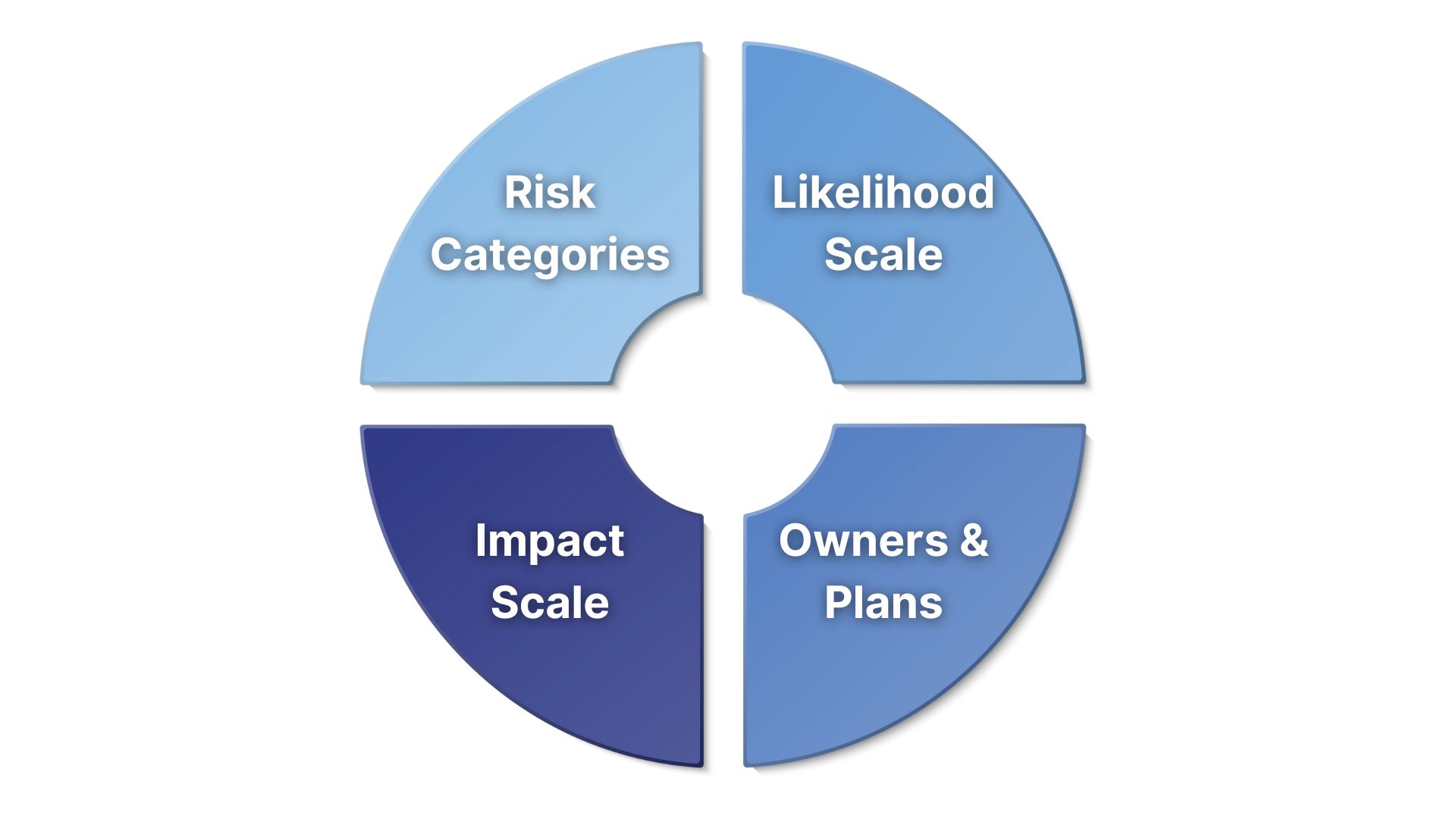
What makes a risk assessment matrix useful? Yes, colors are great indicators, but surely that’s not everything it has to offer. The value lies in its core components. In this section, we’ll discuss each element and study its purpose and how it fits into your risk management process.
Risk Categories
Risk categories define the origin of potential threats and can help professionals sort and analyze them systematically. You may wonder: What types of risks should a comprehensive matrix cover? They usually vary by industry and project team, but often include financial, operational, strategic, compliance, and reputational risks.
Likelihood Scale
The likelihood scale measures the probability that a specific risk will occur. It ranges from 1 to 5, but the meaning of each level must be explicitly defined. It can help avoid guesswork and misalignment across teams. For example, a “4” can refer to events that occur every quarter, while a “2” indicates a problem that happens once every 2 years.
Tip: You can use historical logs, customer support trends, or incident reports to get evidence-based input before you assign likelihood scores. This way, you ensure professionals do not under- or overestimate threats.
Impact Scale
Impact reflects the severity of consequences if the risk materializes. Professionals usually use a 1-5 scale to score it, but the best approach is to define what impact means for a specific context. Ask yourself: What does the impact score represent for your business? I recommend linking impact levels in your risk assessment matrix to measurable metrics, such as revenue loss thresholds, project delays in days, or compliance fines.
Example: A 5 for a cybersecurity team could mean major data breach issues. However, for marketing, it might mean reputational damage, which negatively impacts brand trust.
Risk Owners and Response Plans
The next question to ask: Who owns each risk, and what is the response plan? It is best to assign a specific owner: a person responsible for monitoring the risk, updating its status, and initiating next steps. Next, define a response plan: Will you mitigate, transfer, accept, or avoid the risk? Each strategy should include specific actions, timing, and responsible employees.
You can use a color-coded column for response types, such as Mitigate, Avoid, Accept, Transfer, and link each to an Asana task with the dedicated risk owner.
How to Create a Risk Assessment Matrix
Now that you are familiar with the structure of a risk evaluation matrix, we can move to the next step and discuss how to build it. There are 7 main stages you need to go through, and this section will help you complete each one with confidence. I suggest that we get started.
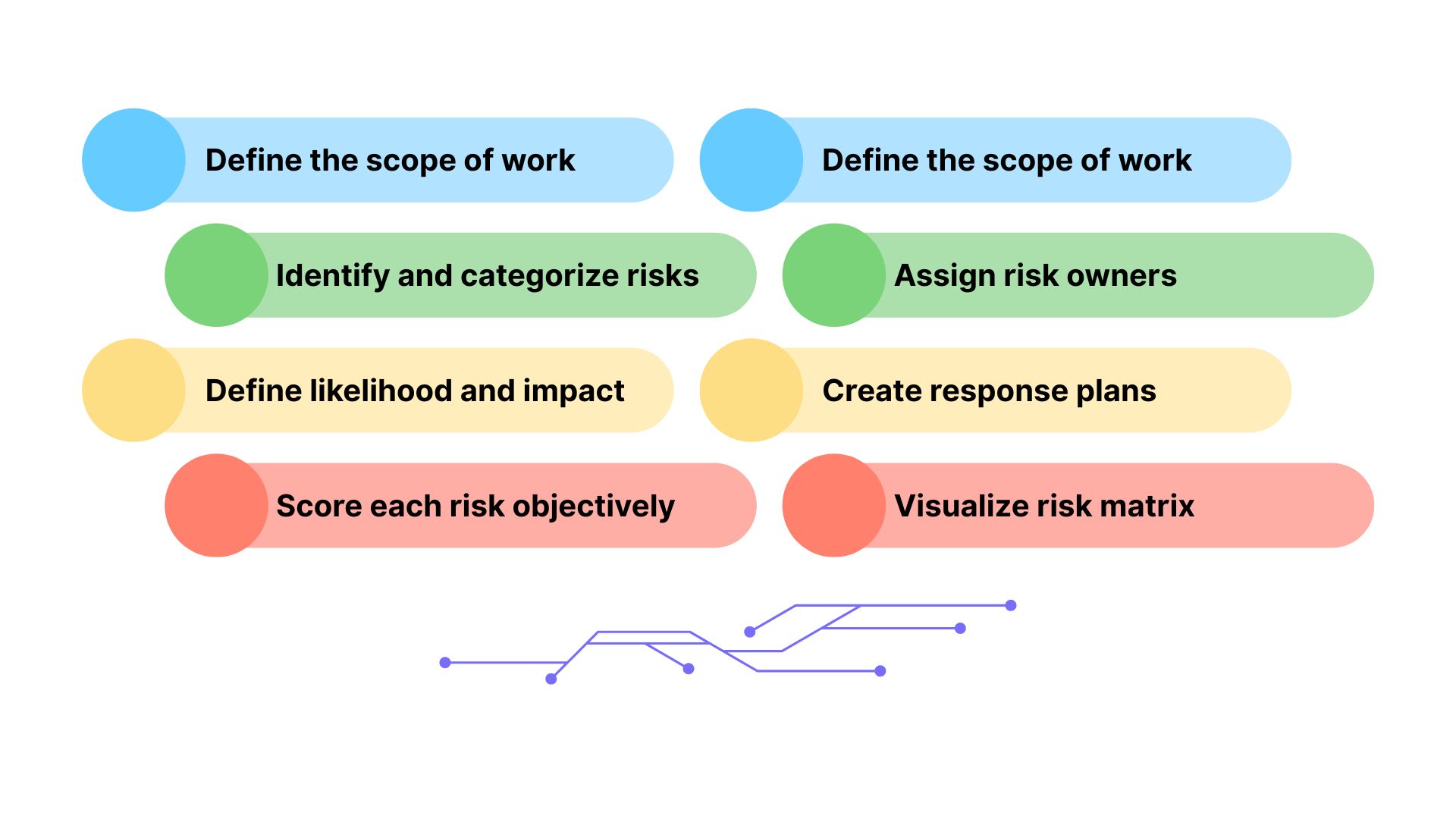
1. Define the Scope of the Risk Assessment
Start by answering: What are we trying to protect and from what? Define the objective of your risk matrix, whether it’s for project delivery, IT infrastructure, vendor relationships, or supply chain continuity. Scope also helps determine who should be involved: product leads for project risks, legal and compliance for regulatory risks.
Tip: Consider tagging your assessment matrix by domain to make it findable and reusable across teams. You can use this template: [Objective Name] Risk Matrix – [Time Period].
2. Identify and Categorize Relevant Risks
Group risks by logical categories, such as strategic, operational, financial, compliance, and reputational. You can gather input from cross-functional teams to identify real threats and avoid assumptions. Ask yourself: What has disrupted us in the past? What would become an obstacle to our current project plan?
Here is what you can include:
- Internal risks: staffing shortages, technical issues
- External risks: regulation changes, vendor delays
- Strategic risks: M&A disruption, market shifts
3. Determine Likelihood and Impact Criteria
Set defined criteria for what “high impact” or “rare occurrence” means for your organization. These definitions ensure risk scoring is consistent across departments and specialists. You can also customize impact categories for each domain: use legal penalties for the compliance department, and churn rate for customer-facing teams.
Here is how it may look in practice:
- Likelihood:
- Rare = once every 3+ years
- Likely = 1-2 times a year
- Frequent = monthly or more
- Impact:
- Low = <1 hour downtime, no customer impact
- Medium = delays one release
- High = loss of revenue or customers
4. Score Each Risk Objectively
Score every risk with a likelihood value and an impact value from 1 to 5. Then you can multiply them or use a pre-built heatmap to determine severity. Although using intuition can be tempting, the key is to base your assessments on actual data. Consider reviewing past incident logs, SLA breaches, audit findings, or support tickets to validate whether the score you want to assign is accurate.
Example: A vendor outage that occurred twice last year and caused missed deadlines could be rated as Likelihood 3, Impact 4 = 12, which makes it a high risk.
5. Assign Risk Owners and Create Response Plans
The next step is to assign a risk owner, someone who is responsible for the threat-related process. Additionally, you need to create a response plan depending on the risk’s level: eliminate the risk, minimize its impact, shift it elsewhere, or monitor it. Include specific triggers that would require action, and add a “Next Review Date” and “Action Status” column to track ownership accountability.
6. Visualize Risk Assessment Matrix
Create a visual heatmap that is easy to scan and analyze. Use a 3×3, 4×4, or 5×5 grid depending on complexity. Spoiler: I have the templates prepared! The goal is to make risk visibility easy for every stakeholder, from project managers to executives. You can use tools like Excel, Google Sheets, or dedicated risk platforms to make updates and automate syncs into dashboards.
Tip: Add tooltips or legends that provide an explanation of what each score and color mean. It prevents misinterpretation, especially when it comes to audits or stakeholder reviews.
7. Review and Update the Risk Matrix Regularly
Last but not least, review your matrix regularly. As an example, return to your matrix every quarter or at major project milestones. You can use automated tools or assign a team member to trigger reviews. During these sessions, reevaluate risk scores, ownership, and assess your mitigation procedure. Look out for pattern changes or gaps in response to avoid them in the future.
Risk Assessment Matrix Automation with Sembly AI
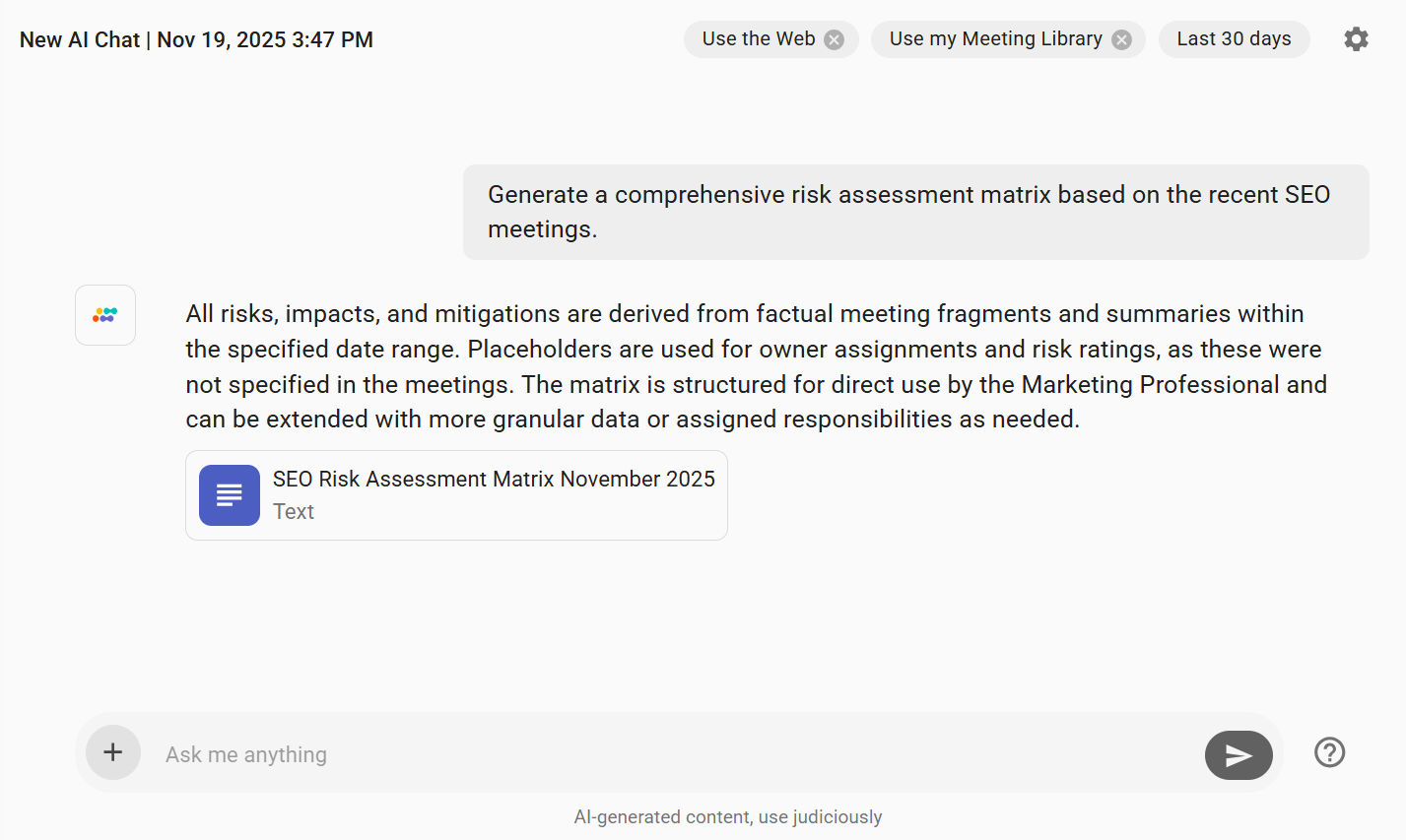
How many “we should flag this” risks weren’t added to the final document, and quietly forgotten? A few for sure. Considering the importance of risk management, not every tool can match the requirements and, most importantly, prove its reliability. So, what if I have an advanced AI meeting assistance with over 2 million analyzed meetings and 2,000 professional teams as clients? Yes, that’s Sembly AI.
Let’s see how Sembly works in practice and generate a risk assessment matrix:
- Go to the My AI Chats section in the side menu.
- Click the New AI Chat button in the upper-right corner.
- Ask Sembly, “Generate a comprehensive risk assessment matrix based on the meetings from [Time] to [Time].”
- Done!
3 Best Risk Assessment Matrix Templates
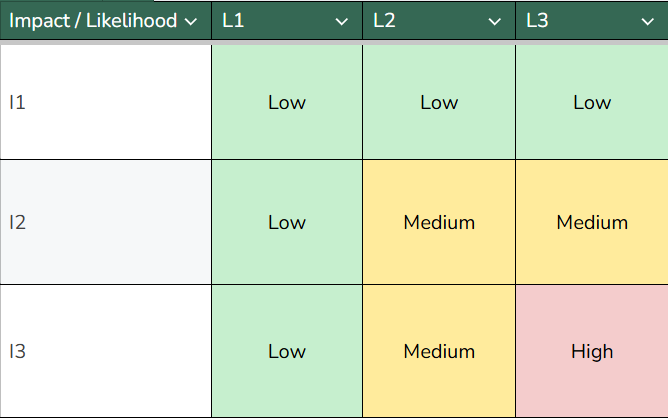
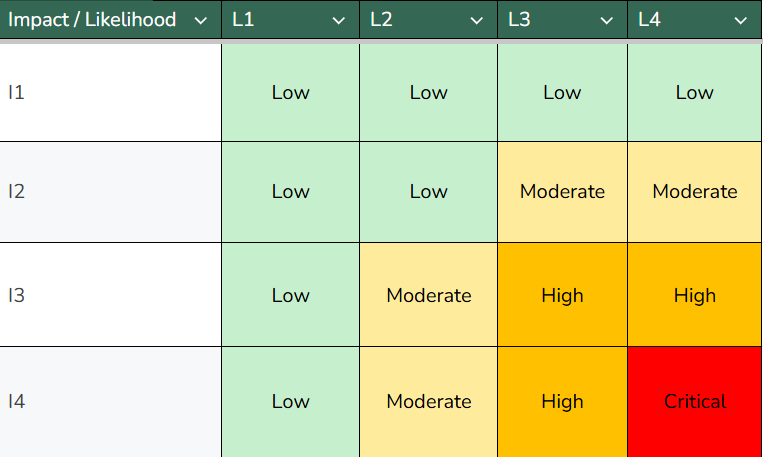
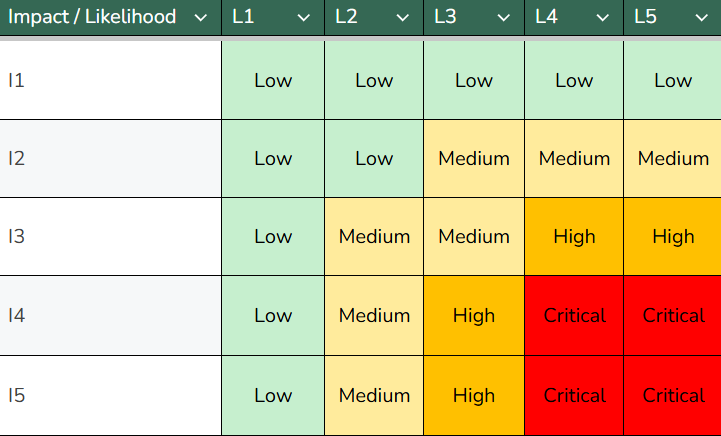
This is what you are here for: practical risk assessment matrix templates. I this section, I have prepared 3 options depending on the level of complexity you need: 3×3, 4×4, and 5×5 risk matrix samples. You can use these as a foundation for your risk management procedure and customize them as you see fit. Let’s take a closer look at the options!
3×3 Risk Matrix Template
The 3×3 risk evaluation matrix template works best for small projects or teams that need fast prioritization. It uses three levels of impact and likelihood (Low, Medium, High), giving a clear understanding of what requires immediate attention. Overall, it is a good choice for small teams, startups, and operational planning.
4×4 Risk Matrix Template
The 4×4 risk assessment matrix balances simplicity and precision. You can use this format to improve discussion quality in project meetings and audits. Overall, it is best for cross-functional projects, vendor assessments, and teams with moderate risk visibility.
5×5 Risk Matrix Template
This 5×5 risk matrix template provides the most detailed view, with five likelihood and impact levels ranging from Low to Medium and High to Critical. It is best for compliance industries, enterprise PMOs, or any organization that needs to conduct ongoing risk and control assessments.
4 Risk Assessment Matrix Examples
What about risk assessment matrix examples? No good article ends with practical cases, right? After all, there is no better way to understand the topic than studying a few samples. I suggest that we review a few options for different domains.
Vendor Management Risk Matrix Example
|
Risk
|
Likelihood
|
Impact
|
Level
|
Response Plan
|
|---|---|---|---|---|
|
Vendor data breach
|
2 (Possible)
|
5 (Critical)
|
High
|
Conduct regular security audits; require SOC 2 compliance
|
|
Vendor financial instability
|
3 (Possible)
|
4 (High)
|
High
|
Request quarterly financial reports; diversify suppliers
|
|
Unapproved subcontracting
|
2 (Unlikely)
|
3 (Moderate)
|
Medium
|
Include third-party disclosure in contracts; audit annually
|
Change Management Risk Matrix Example
|
Risk
|
Likelihood
|
Impact
|
Level
|
Response Plan
|
|---|---|---|---|---|
|
Employee resistance
|
3 (Possible)
|
3 (High)
|
Medium
|
Communicate reasons early; host Q&A sessions
|
|
Misalignment between departments
|
3 (Possible)
|
4 (High)
|
High
|
|
|
Leadership communication gap
|
2 (Unlikely)
|
5 (Critical)
|
Critical
|
Establish top-down communication sequence; assign change ambassadors
|
Supply Chain Risk Matrix Example
|
Risk
|
Likelihood
|
Impact
|
Level
|
Response Plan
|
|---|---|---|---|---|
|
Transportation delays
|
4 (Likely)
|
2 (Moderate)
|
Medium
|
Maintain backup carriers; use real-time tracking tools
|
|
Supplier bankruptcy
|
2 (Possible)
|
5 (Critical)
|
High
|
Conduct quarterly credit reviews; prepare vendor backup list
|
|
Geopolitical disruptions
|
2 (Unlikely)
|
5 (Critical)
|
Critical
|
Diversify supplier regions; review insurance coverage
|
Compliance Risk Assessment Matrix Example
|
Risk
|
Likelihood
|
Impact
|
Level
|
Response Plan
|
|---|---|---|---|---|
|
2 (Possible)
|
5 (Critical)
|
High
|
Conduct quarterly data audits; revise retention policies
|
|
|
Incomplete documentation for audit
|
3 (Likely)
|
3 (High)
|
Medium
|
Automate evidence collection; standardize templates
|
|
Vendor non-compliance with standards
|
2 (Unlikely)
|
5 (Critical)
|
Critical
|
Include compliance clauses in contracts; audit vendors annually
|
Wrapping Up
An effective risk assessment matrix is a decision-making framework that sets proactive teams apart from reactive ones. When used right, it can help your organization identify vulnerabilities, prioritize actions, and align your strategy with reality. The key? Consistent use, clear ownership, response plans, and timely updates.
In this article, we have reviewed templates for a risk assessment matrix with examples, studied key components, and explored creation steps. I hope that from now on, your risk management process will be more structured and effective. Good luck!
FAQ
What is a risk assessment matrix?
A risk assessment matrix is a visual tool that helps organizations identify, evaluate, and prioritize risks based on their likelihood and impact. It usually uses a grid format, such as 3×3, 4×4, or 5×5, to assign a severity rating and determine the appropriate response strategy.
How to calculate risk assessment matrix?
To calculate a risk assessment matrix, multiply the likelihood score by the impact score for each risk.
Example: If a risk has a likelihood of 4 (likely) and an impact of 3 (moderate), its risk score is 12. The matrix then categorizes this score into risk levels like low, medium, high, or critical.
What is the purpose of a risk assessment matrix?
The purpose of a risk assessment matrix is to simplify complex risk evaluations and improve risk visibility and prioritization.
Here is what risk matrix helps professionals with:
- Prioritize risks efficiently
- Improve resource allocation
- Improve communication across teams and departments
- Support compliance efforts
- Optimize decision-making process
- Monitor changes over time
- Standardize evaluations
How to read a risk assessment matrix?
Here are the steps you need to take:
- Locate the risk: Find the intersection between the likelihood (rows) and impact (columns) of a specific risk.
- Identify the color code: Check the color in the intersecting cell to get an understanding about severity.
- Study the risk level: Each cell corresponds to a level, which defines how urgently the risk should be addressed.
- Review supporting details: Each risk should have associated data: source, potential consequences, existing controls, and risk owner.
- Take action: Use the risk rating to guide your response plan based on its priority and your organization’s tolerance.
How often should you update a risk assessment matrix?
It is best to update risk assessment matrices quarterly or after major changes. For example, when you have new vendors, plan product launches, update regulations, or notice market shifts.
What is the difference between a risk register and a risk matrix?
A risk register is a detailed list of all risks, which includes their owners, mitigation actions, and status.
A risk matrix, on the other hand, is a visual tool that maps risks by severity and likelihood.
What is the best risk assessment matrix software?
The best AI software for risk assessment matrix automation is Sembly AI. This app automatically extracts risks, issues, and notable events from your conversations and can generate comprehensive risk-related documents based on the meeting content.
How to choose a format for a risk assessment matrix?
The best format for your risk evaluation matrix depends on complexity. Here are some details on the use cases for each variant:
- 3×3 matrix: It is best for smaller teams or projects with fewer variables.
- 4×4 matrix: It is idea for growing teams that need more details.
- 5×5 matrix: This option works best for enterprise-level risk management where impact and probability need precision.
- Multi-meeting chats
- AI Insights
- AI Artifacts

You might also like
