
Table of Contents
ToggleYou’ve scoped the project, aligned the team, but something’s still off, and professionals keep missing deadlines. Why? Most delays and bottlenecks result from a single root cause: unstructured collaboration. It often leads to missed tasks, duplicated effort, and silent blockers that may turn into a full-blown disaster. Fortunately, it is nothing project workstreams cannot fix.
In this guide, we’ll discuss the workstreams definition in project management, explore their structure, benefits, and study examples across industries. You’ll also learn steps to develop effective workstreams and use automation to improve productivity. Let’s dive in, shall we?
What is a Workstream in Project Management?
A workstream is a focused flow of related tasks and activities within a project, aligned toward a specific objective. It helps professionals divide complex efforts into clear areas of ownership. Unlike phases, which have a linear timeline, workstreams run in parallel, allowing different teams to handle specific deliverables simultaneously.
Example: During a product launch, the first workstream may focus on content creation, the second targets legal approvals, and a third revolves around social media.
The Main Types of Project Management Workstreams
Now that you are familiar with the definition, it is time to move to the next question: What are the main types of workstreams in project management? There is no universal template that suits all kinds of cases, so the best professionals align workstreams with their goals, teams, and outputs.
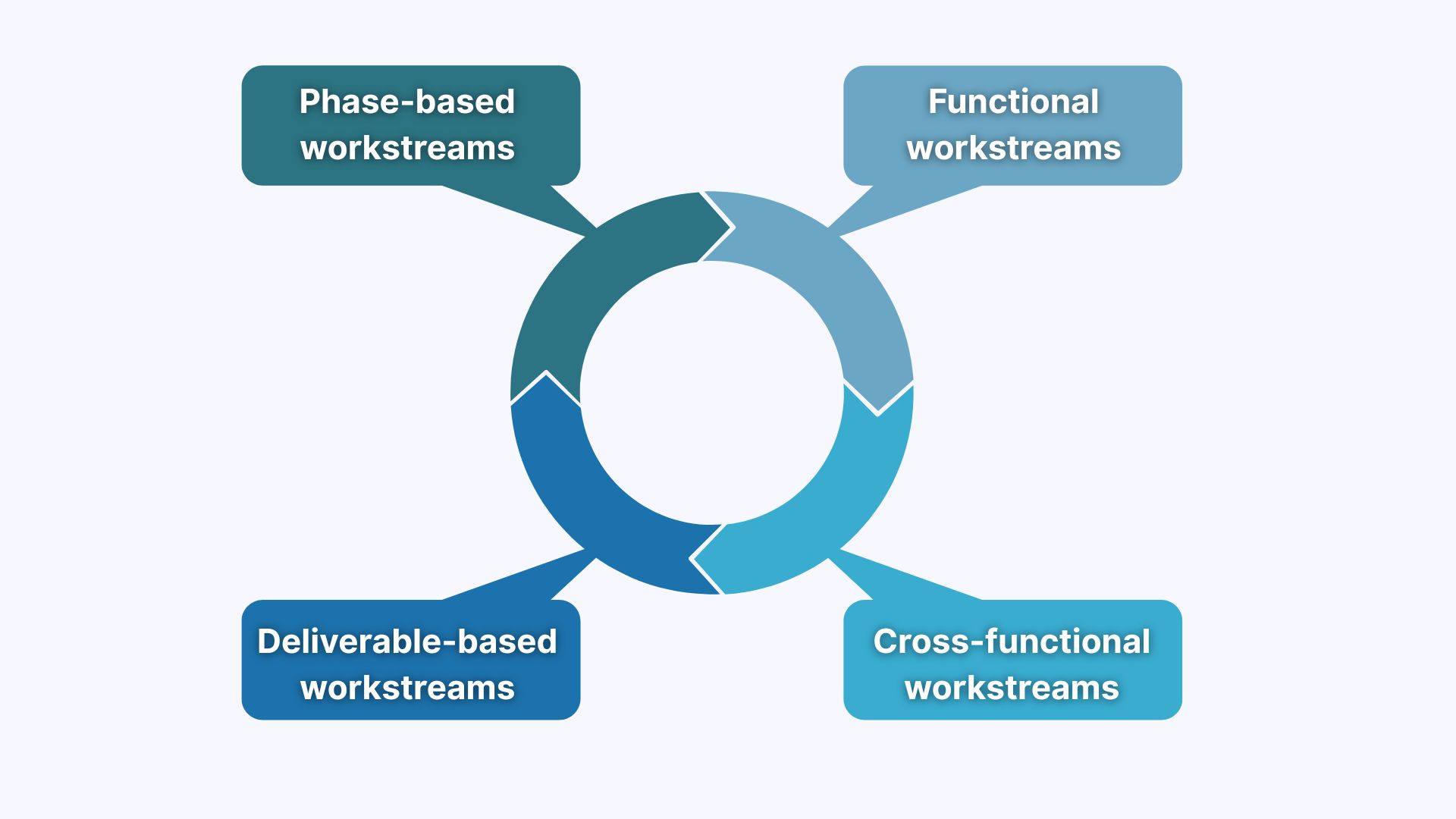
There are four types of project workstreams:
- Functional workstreams: This example is based on departments or specialties and often helps clarify employee responsibilities.
- Workstreams based on deliverables: These revolve around specific outputs and are ideal for cross-functional teams.
- Phase-based workstreams: This type is linked to project stages and works best for the tasks that follow sequential logic but require different owners.
- Cross-functional workstreams: These are used for close collaboration across teams or departments and require strong communication channels.
The Importance of Workstreams in Modern Business Practices
Structured operational workstreams align tasks, teams, and timelines, so that every team member knows what to do, when to do it, and how their work connects to the goal. If you are still in two minds about the importance of this strategy, I suggest that we examine the numbers from the recent industry reports:
- More than 40% of project managers believe that miscommunication, scope changes, and vague requirements often result in repetitive work (ComputerWeekly).
- Only 48% of projects were successful, with 12% failing (Project Management Institute).
- Effective frameworks and agile practices improved team efficiency for 69% of project managers (ComputerWeekly).
To conclude, the difference between a successful and a failed case lies in well-defined and structured project workstreams. Without a clear scope and activities, the likelihood of delays and obstacles significantly increases.
What Are the Benefits of Workstreams in Project Management?
When the number of tasks increases and ownership gets unclear, what starts as a smart idea often turns into overlapping workstreams. Teams have the skills, ambitions, and expertise, but without structure, even the best intentions lead to delays and poor project outcomes.
So, what are the benefits of workstreams in project management? I have just the answer:
- Improved project organization: Workstreams break complex projects into manageable sections, which prevents teams from switching between tasks or duplicating effort.
- Efficient resource allocation: Project managers can assign individuals based on strengths, availability, and workload to avoid bottlenecks and reduce burnout.
- Improved dependency and risk management: Workstreams in project management help professionals proactively address blockers and adjust timelines.
- Simplified performance reviews: Feedback can be tied to specific areas of responsibility, so it’s easier to evaluate what worked, what didn’t, and where to improve.
Surely, these are not the only benefits that workstreams in project management bring to the table. However, these are the “fantastic four” that have the most potential to improve the results.
What is the Workstream Structure in Project Management?
The project management workstreams structure is a strategic framework that organizes a project into segments, focusing on specific goals with owners, timelines, and deliverables. This structure enables managers to handle dependencies, improve resource allocation, and maintain accountability.
Clear Objectives and Logical Scope
Every project workstream begins with a focused scope of work and a clearly defined objective aligned with company-wide goals. Define the timeline of execution from start to finish and document expected outcomes in a central space, such as Google Workspace, Dropbox, or SmartSuite.
Tip: Avoid vague goals, such as “assist marketing team”. Instead, use actionable ones, such as “deliver [Task Name] with stakeholder feedback by [Due Date].”
Dependencies, Milestones, and Accountability
The next core workstream elements are measurable milestones, identified task dependencies, and ownership. They help project management teams visualize the flow and understand what’s blocking the progress. You can use a Gantt chart, Kanban view, or any other custom dashboard to bring clarity into the process.
Here are a few tips and explanations on each aspect:
- Milestones: Act as checkpoints for progress, helping measure the progress of project workstreams.
- Dependencies: When managers map out relations, they avoid chain reactions of delay.
- Accountability: Ensures there is an owner who coordinates execution, manages risk, and resolves issues as they arise.
Coordination Tools and Collaboration
Strong workstream examples require seamless coordination. Why? When individuals spend less time clarifying responsibilities, they can focus fully on executing tasks and solving problems. This is highly important in cross-functional workstreams, when multiple teams collaborate on a single launch.
Traditionally, I have prepared a few tips for this aspect:
- Set up regular syncs and enable external guest access for stakeholders.
- Use performance monitoring dashboards to visualize task progress, detect inefficiencies, and prevent delays.
- Capture updates, decisions, and customer feedback with advanced AI tools, such as Sembly.
How to Develop Effective Workstreams in Project Management
Would you like your project management workstreams to drive results? Start with a structured approach. The key lies in designing each workstream around a specific objective, assigning clear ownership, and aligning tasks with resources, deadlines, and dependencies. As a result, you get more confident execution, fewer surprises, and measurable progress.
Here is a step-by-step framework that will help you navigate the topic with confidence:
1. Define Project Objectives
The first step is to break the larger goal into clear segments based on particular goals. I recommend using the SMART approach so that your targets are specific, measurable, achievable, time-bound, and clearly aligned with the overall strategy. In practice, this could mean turning “launch new product” into small, outcome-based goals, such as “finalize product design,” “prepare a go-to-market and sales plan,” or “test user onboarding.”
2. Identify Deliverables and Scope
The next step is to set boundaries and discuss what’s included or not. Why? Each workstream needs accurately defined deliverables and a well-bounded scope. This helps prevent overlap between teams and ensures no important items slip through the cracks.
Example: In a product launch, one workstream might be responsible for website content while another handles in-app messaging. When you define the scope, you also improve the precision of estimations and risk management later on.
3. Assign Ownership and Roles
The third step is to assign a lead with decision-making authority and accountability to create alignment and speed up execution. Roles should also be defined for collaborators, contributors, and stakeholders. Consider using a RACI model to clarify who does what. Otherwise, without clear ownership, tasks can get stuck in review loops.
Here is how the exact steps can look:
- Appoint a single decision-maker for each stream.
- Define backup roles to prevent momentum loss.
- Clarify stakeholder involvement early to manage expectations and approvals.
- Limit overlapping responsibilities to reduce confusion.
4. List Tasks and Dependencies
Once the scope is defined, break down the project into actionable tasks and identify any dependencies between them. Why bother? Mapping them early helps teams avoid timeline clashes, reduce downtime, and identify risks that may not show up in the task list alone.
Traditionally, here is a checklist, so your project workstream has a solid list of tasks:
- Create task breakdowns with owners and deadlines.
- Identify blockers that could delay the project.
- Map task sequences using a Gantt chart, timeline, or flowchart.
- Link shared resources across streams to avoid overload.
- Flag external dependencies.
5. Set Milestones and Allocate Resources
Once you have completed the list of tasks and dependencies, the next step is to define checkpoints and ensure each workstream has the people, time, and tools to reach them. Every milestone should represent a meaningful outcome and real progress toward your goal.
Start by identifying what success looks like at each stage, then assign skilled team members who can own that task. Try to balance workloads across project workstreams to avoid burnout. After all, no one benefits from an exhausted team, right?
6. Establish Communication Channels
The last step is to define how and when your team will communicate. Think: Will you hold weekly stand-ups? Async updates? Sprint reviews? The method is not as important as the consistency, so align the channel with your team culture. Ideally, every project workstream should have a shared space for updates and a schedule for check-ins.
Here are some of the popular communication tools and teams they suit best:
- Microsoft Teams: These are great for remote teams that require real-time or asynchronous collaboration.
- Google Chat: It is best for teams that already use Google Workspace. This channel easily integrates with Docs, Sheets, and Calendar.
- ClickUp: This communication channel is ideal for cross-functional product and engineering teams who want built-in status updates and task tracking.
- Loom: This tool is a good choice for async teams working across time zones.
- Notion: Consider this app if you need to document decisions, summaries, and long-form updates in one place.
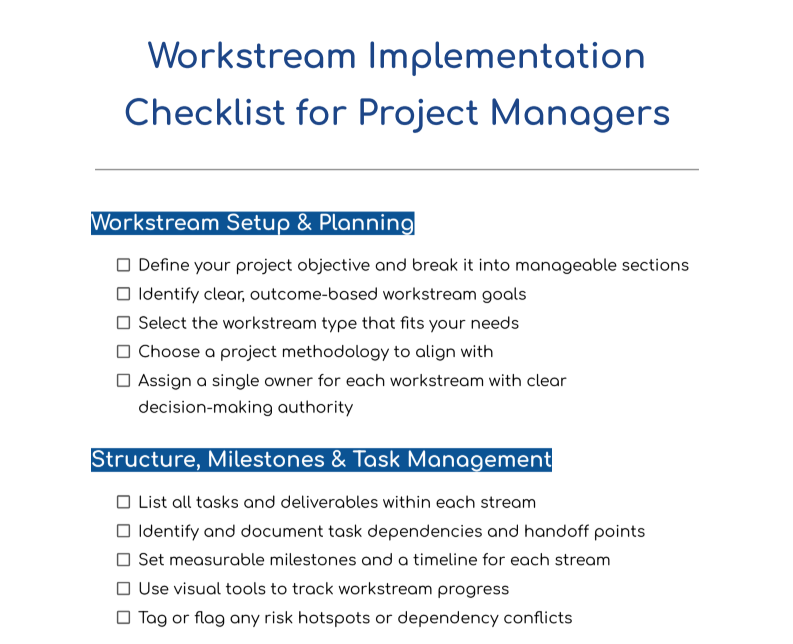
Workstream Checklist for Project Managers
You can use this checklist to build, manage, and improve structured workstreams. It’s designed for shifting priorities, remote collaboration, overlapping workstreams, and high expectations.
Workstreams Automation in Project Management
80% of millennials and more than 70% of Gen Z believe that AI could improve their work (Monday). In project management, your workstream automation partner is Sembly AI. You no longer have to chase updates, ask “Can you remind me what we agreed on?”, or worry if your teammate has missed a call. Sembly keeps the context connected across every employee, team leader, and stakeholder.
So, what does workstream AI, such as Sembly, do exactly?
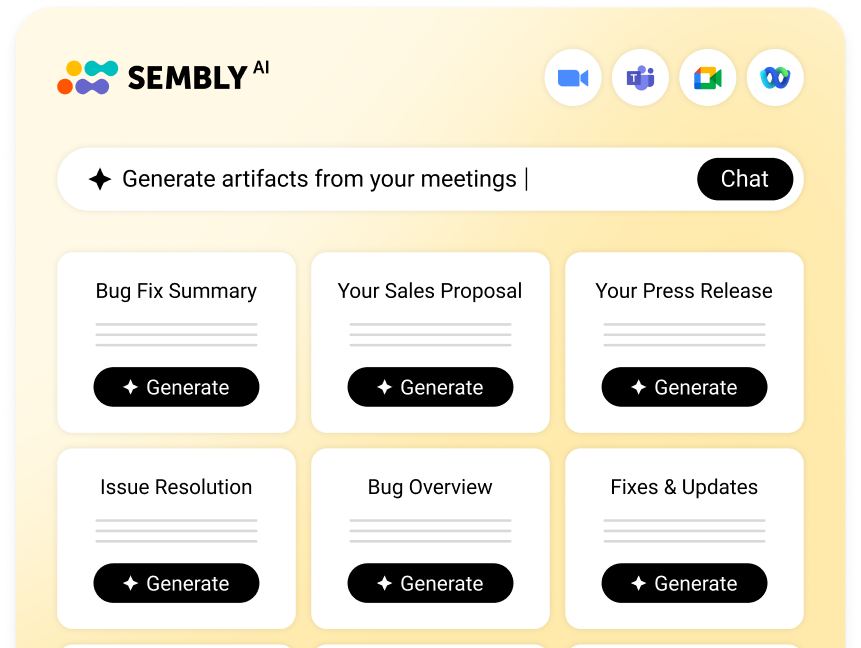
- The app joins meetings across popular platforms: Google Meet, Webex, Microsoft Teams, or Zoom.
- Automatically records, transcribes, and summarises conversations.
- Extracts key items and tasks along with owners, assignees, and deadlines.
- Generates personalized insights with automatic workstreams, owners, descriptions, and potential deliverables.
- Generates comprehensive project documentation based on the meeting content.
With Sembly, you have visibility into the progress, can identify threats or gaps, and automate deliverables within minutes. The app is designed to help with complex projects and improve teamwork.
5 Examples of Workstreams in Various Industries
What’s a good article without practical project workstream examples? In this section, I have prepared a list of variants across industries, such as technology, healthcare, legal services, EdTech, and online advertising. Each demonstrates how to apply workstreams in project management to address complexity, dependencies, and deadlines.
Technology: Agile Software Development
Industry challenge: Professionals often manage multiple sprints. There is also cross-functional collaboration and high expectations from stakeholders in fast cycles.
Example: Launching a new AI dashboard feature
Project objective: Deliver the feature in 8 weeks for enterprise clients.
Workstream examples:
- Backend development: Build the API endpoints, ensure system integration
- UI/UX design: Prototype user flows, gather user feedback, finalize visual components
- QA: Execute unit tests, edge case testing, and accessibility validation
- Compliance & security: Ensure SOC 2 and GDPR alignment
- Documentation & training: Create internal wikis and customer-facing guides; update sales proposals
Tools: Jira, Figma, Sembly, Postman, Confluence, SmartSuite
Dependencies: Designers must finalize visual components before developers finish their task → developers must complete their part before QA → documentation depends on feature stability.
EdTech: Online Course Development
Industry challenge: Project managers have to coordinate instructional design, video production, platform development, and quality standards across remote teams.
Example: Launching a new project management certification course
Project objective: Develop a comprehensive online course in 10 weeks.
Workstream examples:
- Curriculum development: Design the syllabus, learning outcomes, and module structure
- Content production: Script lessons, film videos, edit footage, and finalize media assets
- Platform integration: Upload course materials, set up assessments, and ensure compliance
- Quality & accessibility review: Test for usability, mobile responsiveness, and meet WCAG standards
- Instructor onboarding & feedback: Train instructors on platform tools and gather early feedback from beta users
Tools: Google Workspace, Dropbox, LMS platforms, Sembly, KnowledgeHut references, Microsoft 365
Dependencies: Content must follow the curriculum outline → platform setup relies on finished media → accessibility team reviews before launch → final quiz scoring logic tested after integration
Healthcare: Clinical Trial Coordination
Industry challenge: High regulation, large stakeholder groups, strict timelines, and data sensitivity.
Example: Running a phase II clinical trial for a new medication
Project objective: Complete trial prep and participant onboarding within 3 months.
Workstream examples:
- Regulatory compliance: Obtain IRB/ethics approval, ensure protocol follows FDA/EMA guidelines
- Site preparation: Train local clinics, ensure tools, files, and data protocols are in place
- Participant recruitment: Create outreach materials, manage eligibility screening
- Data management: Set up secure databases, monitor real-time metrics, and ensure compliance
- Reporting & review: Prepare preliminary results for stakeholder meetings
Tools: Google Workspace, Dropbox for secure sharing, video conferencing, project dashboards, KnowledgeHut training resources
Dependencies: Site readiness before recruitment → data integrity before reporting.
Legal Services: M&A Deal Management
Industry challenge: Professionals have to coordinate sensitive document flows, legal reviews, and manage multi-party collaboration under pressure.
Example: Handling a mid-sized acquisition between two fintech businesses
Project objective: Finalize contracts, approvals, and filings within 45 days.
Workstream examples:
- Contract drafting: Align terms with business, tax, and regulatory requirements
- Regulatory review: Validate compliance with financial authorities in both regions
- Stakeholder coordination: Secure approvals from internal counsel, boards, and external advisors
- Client negotiation & redlines: Track changes and resolve issues in real time
- Filing & archival: Store signed docs in encrypted systems, update legal indexes
Tools: Workstorm, DocuSign, Sembly, Microsoft 365, PRINCE2 Foundation frameworks
Dependencies: Regulatory clearance must precede final signature → redlines must be resolved before board approval.
Online Advertising: Cross-Platform Campaign Execution
Industry challenge: Project managers must coordinate high-budget ad campaigns across multiple platforms, lead creative teams, and data analysts, while staying compliant and on schedule.
Example: Executing a $150K multichannel ad campaign for a product launch
Project objective: Launch synchronized ad sets across Google, Meta, and LinkedIn to drive 10,000 qualified leads in 4 weeks.
Workstream examples:
- Planning & budget allocation: Define goals, set budgets per channel, forecast ROAS, and align timelines.
- Creative production & approvals: Design static and video ads, write copy variants, gather compliance approvals.
- Platform setup & targeting configuration: Build campaigns in Google Ads, Meta Ads Manager, and LinkedIn Campaign Manager. Set A/B tests, audiences, geo-targeting, and device rules.
- Performance monitoring & optimization: Set daily benchmarks, monitor spend pacing, and pause underperformers.
- Client reporting: Build dashboards for weekly client syncs. Summarize learnings, performance insights, and recommendations for the next iteration.
Tools: Google Workspace, Dropbox, Meta Ads Manager, Google Ads, SmartSuite, Sembly, Microsoft Excel, Workstorm
Dependencies: Creative production must finish before platform setup → budget pacing insights depend on accurate real-time data → final reporting relies on tag accuracy and conversion tracking.
5 Workstream Best Practices for Project Managers
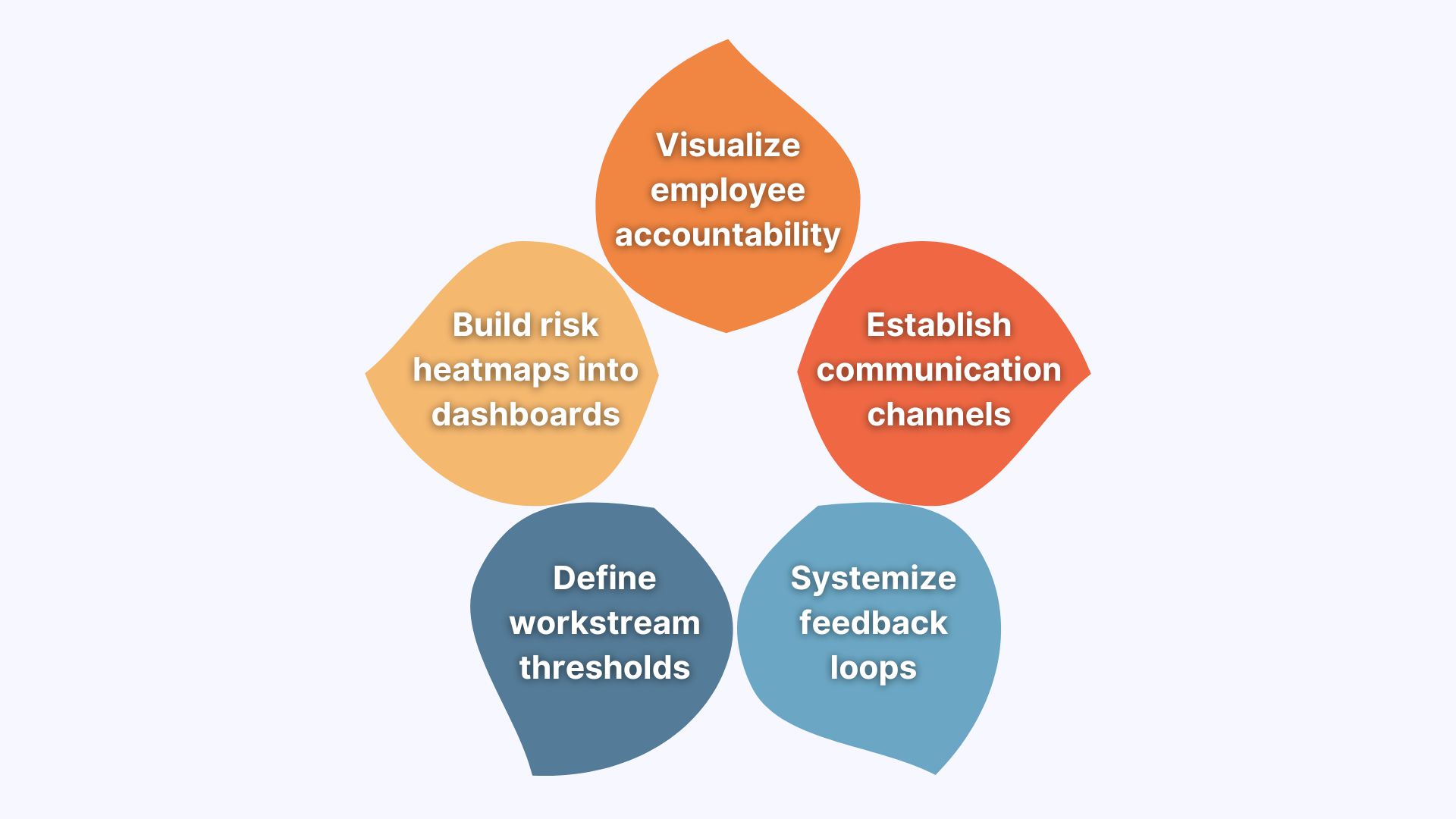
So, what are the recommendations for workstream project management? We have seen the examples, studied the workstream definition, structure, and importance, but what makes it effective? Traditionally, I have hand-picked some simple yet working tips that can help you set up your work with confidence.
Establish Effective Communication Channels
Define exactly where and how teams communicate. Set async update rules, such as weekly check-ins via voice messages, progress logs in project management tools, or team standups, only when blockers arise. Think of communication as your coordination insurance policy.
Example: Use specific Slack channels, dashboards in SmartSuite, or centralized Google Docs. For high-stakes projects, record important conversations and summarize outcomes using AI notetakers like Sembly.
Define Workstream Thresholds
One of the underrated recommendations for workstreams in project management is defining a threshold. Most teams assign workstream leads, yes, but only a few define when that lead should escalate, change the scope, or pause execution. Those who do, reduce guesswork and ensure issues surface before they escalate.
Here are a few examples of escalation thresholds:
- “If [Task Name] is delayed by more than [Number] days, involve [Manager Name].”
- “If a [Blocker Name] affects more than one stream, schedule a [Type of Meeting].”
Build Risk Heatmap into the Planning Dashboard
Consider incorporating a risk heatmap or flag system in your workstream dashboard. It can help you highlight high-dependency tasks, tasks owned by one person with unique knowledge, or steps vulnerable to scope changes. As a result, managers gain a better visibility into the gaps in knowledge, resourcing, or accountability.
Visualize Employee Accountability
Assign owners, define escalation paths, and make it visible to every team member. You can use dashboards or status views where employees can self-check deadlines, deliverables, and blockers without having to schedule daily syncs.
Tip: For external stakeholders or guests, provide view-only access with comments enabled, so they stay informed, without influencing execution with last-minute changes.
Systemize Feedback Loops Within Workstreams
Encourage weekly 10-minute async feedback loops. Ensure they are structured, focused, and easy to act on. Instead of asking generic questions, create a fixed 3-4 question format and link it to execution and coordination.
Here are a few questions to raise during the meeting and strengthen your project workstreams:
- What slowed us down this week?
- What assumptions did we get wrong?
- What did we repeat? Can we make a template instead to improve our workflows?
Over time, these feedback loops can become your team’s feedback engine and significantly improve project outcomes.
Wrapping Up
While every project starts with promising ideas, it is the structure that carries it across the finish line.
Workstreams provide your team with clarity when priorities compete, momentum when complexity arises, and alignment when things start to drift. The key? Build your workstreams with intention, define ownership, analyze dependencies early, automate the follow-through, and create space for feedback that improves teamwork.
In this article, we have covered the main questions: What is a workstream and its main types? What are the best practices, and how do you use workstreams automation? I hope you have gained all the information you needed to navigate the topic with confidence. Good luck!
FAQ
What is a workstream in project management?
A workstream in project management is a focused sequence of tasks that are linked to a specific objective within a wider goal. Each workstream has its own owner, timeline, and deliverables, and usually runs in parallel with other streams.
What are workstreams main benefits?
Here are the key benefits of workstreams in project management:
- Clear execution: Every team member knows what to focus on, when, and why.
- Improved accountability: Each workstream has a defined owner and measurable outcomes.
- Better resource allocation: Managers can assign tasks based on workload, expertise, and priorities.
- Faster delivery: Multiple streams can run in parallel, reducing project timelines.
- Reduced misalignment: Clear structure prevents duplication and gaps.
- Improved communication: Defined channels and sync points keep teams informed.
- Visibility for stakeholders: Dashboards and workstream updates offer real-time status.
How do you create a workstream step-by-step?
- Define the project goal
- Break it down into major deliverables
- Group related tasks into focused streams
- Assign a stream owner
- Map dependencies and milestones
- Allocate resources and set timelines
- Use dashboards to track progress
- Schedule regular syncs and feedback loops
This structure helps professional teams effectively complete tasks and adapt as the project moves forward.
How can you avoid common workstream problems?
You can avoid some of the common mistakes by doing the following:
- Assigning one clear owner per stream
- Mapping dependencies between streams early
- Using shared dashboards for visibility
- Holding regular async retrospectives
- Automating post-meeting tasks and deliverables
What is the difference between a workstream and a project?
A project is the full initiative with a defined goal, timeline, and outcome. A workstream is one focused part of that project, which is responsible for a specific set of tasks or deliverables.
What are the workstream roles and responsibilities?
Here are the key three roles in workstreams in project management:
- Workstream owner: Leads the stream, manages tasks, resolves blockers, and reports progress
- Contributors: Execute tasks, communicate updates, and flag risks
- Project manager: Oversees all streams, aligns timelines, and resolves cross-stream conflicts
How do you manage overlapping workstreams?
Here are the most effective strategies for overlapping workstreams:
- Map dependencies early: Identify shared resources, timelines, and deliverables across streams.
- Assign one owner per workstream: Avoid confusion by ensuring every stream has an accountable lead.
- Use shared dashboards: Track progress using tools, such as SmartSuite, Microsoft 365, or Workstorm.
- Implement cross-stream syncs: Schedule short weekly meetings to discuss blockers and align priorities.
- Automate meeting outcomes: Use advanced AI notetakers like Sembly to capture key decisions and tasks across all streams.
- Build in buffer windows: Leave 24-48 hours between handoffs to reduce last-minute dependencies.
- Create visibility rules: Keep critical info centralized and accessible to all relevant streams.
What are the challenges in workstream project management?
Here are the key 6 challenges in workstream project management:
- Dependency conflicts
- Ineffective communication
- Uneven resource allocation
- Lack of employee accountability
- Tool fragmentation
- Misaligned priorities
- Multi-meeting chats
- AI Insights
- AI Artifacts

You might also like
