AI, Automation
AI Use Cases in Consulting: A Field Guide (2026)
Updated: June 3, 2026 · 13 min read
Table of Contents
ToggleMost AI conversations in consulting start with the exciting stuff: predictive analytics, scenario modeling, and AI that writes your strategy. However, from what I see on the ground, it’s rarely those that move the needle in the first month.
I build meeting intelligence software for professional services and spend a lot of time on calls with these teams. The strategic applications do deliver, but they need setup time and data maturity that most firms are still building toward. The operational ones start working in weeks, because they attach to meetings, and a consulting firm’s week is mostly that, isn’t it?
This guide covers both. I flag where each use case pays off and where it still disappoints. I also spoke with Kateryna Samotoi, a revenue operations consultant who works with scaling go-to-market teams. Her observations appear throughout the guide.
What Is the State of AI in Consulting These Days?
AI is in daily use across consulting. Yes, I have said that and the recent findings support this statement:
- 88% of organizations use AI, up from 78% the year before (McKinsey)
- More than 8 in 10 consultants use AI tools daily (Consultancy.uk)
- Over half report saving three to four hours a day (Consultancy.uk)
- High performers are nearly three times as likely to have rebuilt workflows around AI rather than added it on top (HBR)
That matches what I see: the firms I talk to are past the question of if and stuck on the question of how deep. While AI adoption is now widespread, embedding it into the company operations is a different challenge altogether. In other words, using AI is no longer the hard part.
That’s reflected in McKinsey’s findings: only about one-third of organizations have scaled AI beyond the pilot stage. In many cases, the problem is implementation. Yes, companies add various tools for consultants, but they often leave the underlying workflow unchanged. As a result, the tool does what it’s supposed to do, but the expected return never fully materializes.
The Operational AI Use Cases in Consulting
All five operational use cases run on meetings. A consulting company’s week is kickoffs, interviews, all-hands, and client status calls. Most of the admin hours go to consultants trying to capture conversations and create client documentation.
The five use cases below follow the order of an engagement
1. Capture Client Requirements from Discovery Calls
Record and transcribe discovery calls, then let AI pull the requirements, concerns, decisions, and open questions into a structured brief. This is the use case our team hears about most from consulting firms, and the one where I have watched the alternative go wrong most often.
When a team switches this on, the change I observe is fast. They join the meeting, transcription AI identifies key information, and within minutes of hanging up, they have a list of client needs, named stakeholders, and commitments.
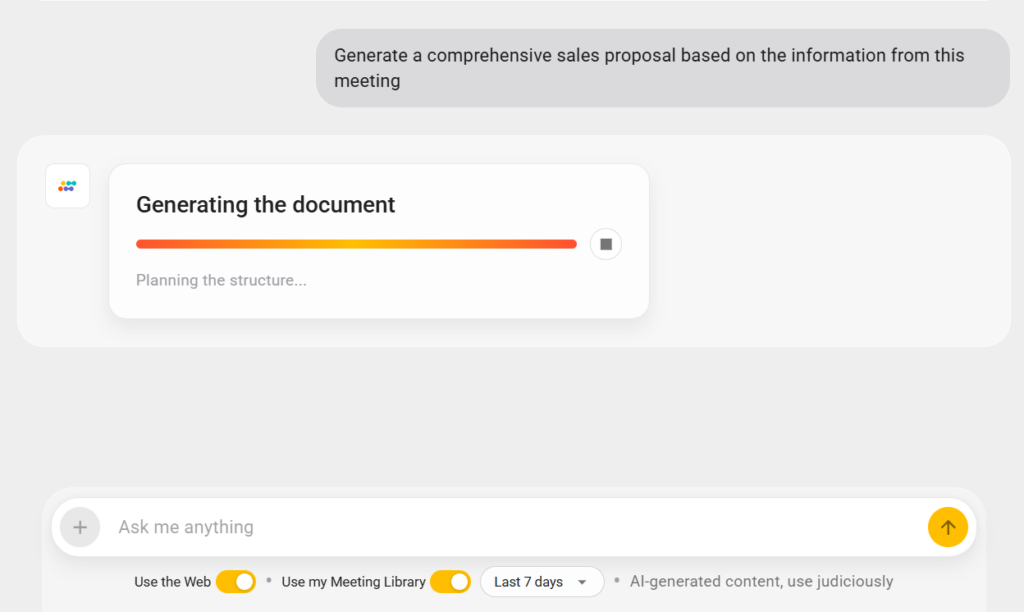
So, how does Sembly fit into all of this? Aside from capturing client requirements, Sembly can also analyze information across multiple meetings to highlight patterns, repetitive concerns, and information gaps. The best thing about it is that you do not have to create a report after; Sembly handles that too.
2. Build Institutional Memory Across Engagements
Index every meeting, decision, and deliverable so a consultant can find what the firm already knows. Otherwise, the next engagement in the same sector reinvents analysis that exists somewhere, usually in a folder nobody can find.
What I think searchable meeting intelligence really changes is the unit of memory. When every client call and internal discussion is searchable, a new consultant can find what the team learned on the last three retail projects in seconds.
This case alone is the clearest proof I have that knowledge management is a meeting problem before it is a document problem. Companies often spend years building wikis, and consultants still ask a colleague. Why? Well, the wiki holds the polished output and not the reasoning behind it. The reasoning itself lives in the conversation. Capture the conversation and the knowledge base finally reflects how the firm actually thinks (not just what it chose to write down).
3. Hand off Knowledge Between Consultants
Use the meeting archive to transfer an account between consultants without dropping context. People rotate on and off consulting engagements constantly. Every one of those handoffs is a moment I watch context get lost, which is basically the unwritten knowledge that makes an account run smoothly.
What I have found makes these transitions survivable is a complete, searchable record of the account’s history. The incoming consultant reads and searches the relevant meetings rather than relying on a rushed 15-minute one-on-one that covers a fraction of what’s important. It is the same memory layer I described earlier, applied to the specific moment a person changes.
4. Automate Client Deliverables
Most consulting output is a synthesis of conversations: interviews with client staff, working sessions with the project team, and partner reviews. I have always thought starting that synthesis from a blank page wastes the most expensive hours in the firm, and watching teams work confirms it.
The consultants I work with use the structured meeting record as raw material. This way, a round of six stakeholder interviews becomes a tagged set of themes, quotes, and contradictions that a consultant shapes into findings.
Katya points to a specific dynamic this changes in revenue work:
5. Prepare for Follow-Ups and Status Updates
Generate the recap, the open-action list, and the next team meeting agenda from the last conversation. Consulting runs on a rhythm of recurring client touchpoints, and I have watched how much each one costs in preparation. Done by hand, this eats up an hour around every meeting, and it is the first thing to slip when the team is busy.
The use I see hold up most consistently is the weekly client status call. AI assistants or agents like Sembly can produce the recap and the carried-over actions before anyone opens a laptop, so the consultant spends preparation time on substance instead.
What good looks like, in my view: every client call has a meeting recap circulated within the same business day, every time, and no partner has to chase for it. I judge this on consistency, not cleverness.

The Strategic AI Use Cases in Consulting
Aside from daily operations, AI also supports three higher-profile consulting applications: predictive analytics, scenario modeling, and risk assessment. These get the headlines and the case studies. They deliver value, though here I am drawing more on research and less on my own day-to-day, because they demand more data maturity and longer timelines than the operational use cases above.
1. Provide Personalized Recommendations with Predictive Analytics
Predictive analytics helps turn a client’s own history into a forecast, so a recommendation rests on data rather than the consultant’s gut. The model learns from past patterns, sales by season, churn by customer type, demand by region, and projects them forward, which lets a team say “here is what the numbers suggest” instead of “here is what usually happens.”
A simple example: a creative agency wants to tell a client how much to spend on each channel next quarter. Rather than repeating last quarter’s split, the team feeds in several years of campaign data, spend, impressions, conversions, and seasonality, and the model projects which channels will return the most per dollar at different budget levels.
2. Test Strategy with Scenario Modeling
Scenario modeling asks “what happens if,” then lets AI run the answer across dozens of versions of the future instead of two or three. The team defines the variables that matter: a price change, a new regulation, a supply shock, and the model shows how each one ripples through revenue, cost, and risk.
A simple example: a marketing agency is helping a client decide how to split a fixed annual budget between brand and performance marketing. The team models several futures, a strong quarter, a flat one, a sudden rise in ad costs, and sees how each split holds up.
3. Flag Exposure with Risk and Compliance Monitoring
Here, risk and compliance AI learns what a normal contract clause, expense, or transaction looks like, then surfaces the outliers. For example, a payment that breaks a pattern, a clause that conflicts with a new regulation, a vendor that matches a sanctions list. The humans still judge each flag, but they spend their hours on the genuine risks rather than on the search.
This is the strategic use case I find most convincing, because the math is simple: in audit, financial services, and any compliance-heavy engagement, the volume of material exceeds what a human team can review, and the cost of a single missed risk is high.
AI Use Cases by Consulting Type
By this point, you know what AI use cases in consulting are based on their type. However, the use cases also shift depending on what a company sells. I mean, a strategy consultant and an IT consultant both sit in meetings all day, but the documents they produce and the data they handle are different for each.
Below is what I see across the six most common consulting types, ordered by how much of the work runs through conversations.
Management Consulting
The primary AI use case in management consulting is stakeholder synthesis. The work is interview-heavy: a typical engagement runs dozens of conversations that have to become a single set of findings. After a round of interviews, AI gives the consultant a clean split: here are the three things everyone agreed on, here are the two places people flatly contradicted each other. That second list is the gold, since the contradictions are usually where the problem likely hides.
The risk specific to this type is sanitized output. A management deck that reads as if no one disagreed in the room is a deck that lost the real signal, so the human still has to put the tension back in.
Strategy Consulting
Strategy consultants gain most from scenario modeling and research synthesis. Strategy is a bet placed under uncertainty, and the AI that matters is the kind that pressure-tests the bet. Scenario modeling lets a team run twenty versions of next year instead of three, and research synthesis pulls a week of market reading into an afternoon.
What it does not do is pick the strategy. The judgment about which scenario the client should bet on stays human, and the companies that forget this often provide confident-sounding recommendations built on whatever the model happened to weight.
IT and Technology Consulting
IT consultants benefit most from technical documentation and requirements capture, since their meetings carry precise details that are expensive to lose. A misheard integration requirement or a half-recorded sprint review costs real rework. AI software records who committed to which decision, and turns a sprint review into a structured requirements list, lifting the documentation burden off the most senior engineer in the room, who is exactly the person you least want typing notes.
The honest limit here? The model captures every word of the architecture discussion but understands none of the architecture, so a human still decides whether the plan is sound.
Marketing and Creative Consulting
Marketing consultants get the most from campaign documentation and client reporting because the work generates a high volume of recurring updates across multiple accounts. Campaign reviews, client check-ins, and performance recaps repeat weekly, and AI handles the documentation so the strategist spends time on the creative and analytical work instead.
The trap is the generic recap (which heavily depends on the tool you use). A client paying for marketing instinct notices in a second when an AI summary has no point of view, so someone still has to add the “here is what I would do about it” line the client actually wants.
HR and Recruitment Consulting
HR & recruitment consultants benefit most from interview synthesis and change-management documentation, where the work is communication-dense and confidentiality-sensitive. Workshops, leadership performance reviews, and organizational evaluations produce material that AI can summarize and track across an engagement.
This type carries the sharpest data-governance requirement of any on this list, because the conversations often contain personal information, so access controls and consent are not optional extras here.
Financial Consulting
Financial consultants gain most from risk monitoring and compliance review. The reason is arithmetic: the volume of transactions and contract language in a compliance engagement is larger than any human team can read, and a single missed clause can cost a client a penalty that dwarfs the whole fee.
AI reads all of it and flags the handful that break a pattern or conflict with current regulations. The standard here is the highest anywhere: every flag is a starting point for a qualified reviewer, and the reviewer’s name, never the model’s, goes on the opinion.
How Does AI Change Consulting Workflows?
I am convinced that the clearest way to see where AI lands is to put the old workflow next to the new one.
The table below maps the consulting tasks that change most, with the manual process on one side and the AI-supported version on the other.
|
Consulting Workflow
|
Traditional Process
|
AI-Supported Process
|
|---|---|---|
|
Meeting documentation
|
A consultant takes notes during the call and creates documents afterward
|
Conversation is transcribed and summarized; deliverables are automated
|
|
Proposal and scope drafting
|
The team reviews notes and drafts a proposal from scratch
|
A structured first draft is built from the discovery-call record, then refined
|
|
Status reporting
|
Updates are compiled manually across tools each week
|
Recaps and carried-over actions generate from the last meeting automatically
|
|
Knowledge management
|
Consultants search disconnected notes and folders, or ask a colleague
|
Every meeting is searchable, so past context surfaces in seconds
|
|
Recap emails are written by hand after each call
|
Draft recaps and next steps are fully automated and only require minor edits
|
What Are the Limitations of AI in Consulting?
A short answer is that AI does not do the core consulting job, which is forming a judgment that a client will stake a decision on. It speeds up the work around that judgment, yes, and stops there.
Here is where I see AI disappoint:
- Inaccuracy risk: A model built to be fluent states a wrong thing as smoothly as a right one, and McKinsey names inaccuracy as the most-cited AI risk across industries.
- Inability to read client dynamics: The unspoken politics of a client relationship usually sit outside the transcript. AI gives you the words, sure, but the room read is something else entirely.
- Dependence on clean data: Most strategic use cases assume clean, integrated data. Most clients I encounter do not have it, and the work of getting data usable is often larger than the AI work that follows.
- No accountability for outcomes: Accountability does not transfer to a tool, which is exactly why every use case above keeps a human in the decision seat.
How Do You Implement AI in Consulting Without Disrupting Client Work?
The teams I watch adopt well almost always do the same thing: they pick a single workflow, usually meeting capture and recaps, run it on internal syncs for a few weeks, and only extend to client calls once the habit and the governance are solid. This protects the client relationship while the firm learns, which is the order I would insist on.
The sequence I recommend follows: pick one use case, run it internally, write down the access and consent rules before any client data is involved, then expand by team. The goal is a changed process, not a new subscription, and I can tell within a few weeks which one a company has actually got.
The common mistake I see most is the reverse: buying AI tools for business at a company-wide level, announcing them, and assuming adoption follows. It does not. From what I have watched, adoption follows a visible win that a trusted colleague shares, which is why I always coach teams to start small and surface the early results.
When Should You Not Use AI in Consulting?
There are four situations where I tell consulting teams to wait, and I say this as someone whose business depends on them saying yes.
- Short engagements: A two-week project does not give the team enough time to build the habit. The setup and learning eat into the same hours the tool is supposed to save, and the client never sees a benefit. For anything under a month, the overhead usually outweighs the return.
- Recording restrictions: Some clients prohibit call recording, transcription, or external data processing, and those restrictions are non-negotiable. A tool that captures conversations is useless if the client’s legal team has not approved it, and pushing the point risks the relationship. Ask first, always.
- Undefined processes: AI is good at making a defined workflow faster. It is bad at fixing a workflow that does not exist. If meetings do not have a consistent structure, if deliverables vary wildly by partner, if nobody agrees on what a recap should contain, then the tool will produce inconsistent output and make the mess more visible. Fix the process first, then hand it to AI.
- Strict confidentiality requirements: Legal engagements, sensitive M&A work, and government contracts sometimes carry data-handling requirements that no third-party tool can meet. When the consequences of a data incident are severe enough, the safest answer is a pen and a locked notebook. No tool is worth a breach.
The honest test I use: if a team cannot name the one workflow they want AI to change, and describe what “better” looks like in specific terms, they are not ready. Buying the tool will not give them clarity. Clarity has to come first.
Wrapping Up
If I were advising a firm starting today, I would tell them the same thing I tell every customer: pick the use case closest to where your hours actually go, and change that one process fully before you touch anything else.
The teams that move first on meeting capture, automated deliverables, or making past work searchable are the ones that come back three months later with the kind of concrete results that get the rest of the company on board. The strategic use cases follow naturally once the operational foundation is in place. They rarely work the other way around.
FAQ
What are the most common AI use cases in consulting?
Companies use AI to automate research, summarize meetings, analyze business data, create consulting reports, and generate presentations.
AI helps consultants complete repetitive tasks faster so they can focus on strategy, problem-solving, and client communication.
What consulting tasks can AI automate?
AI can automate meeting notes, proposal drafting, market research summaries, CRM updates, status reports, data categorization, presentation outlines, and workflow tracking.
How do consultants use AI for market research?
Consultants use market research AI to analyze industry trends, summarize competitor data, identify customer patterns, and organize large volumes of research.
Can AI create consulting deliverables?
AI can help generate consulting deliverables such as business reports, executive summaries, project briefs, SWOT analyses, presentations, and client updates.
Consultants still review and refine the final output to ensure accuracy and strategic relevance.
What are the risks of using AI in consulting?
The main risks include inaccurate outputs, outdated information, biased recommendations, and data privacy concerns.
Consulting firms should review AI-generated content carefully and avoid sharing confidential client information with unsecured platforms.
What is the future of AI in consulting?
AI is expected to become a standard part of consulting workflows. Companies are increasingly using AI for analytics, automation, forecasting, and knowledge management.
Consultants who combine industry expertise with AI tools will likely deliver faster and more scalable services.
What are the biggest benefits of AI in consulting?
Some of the biggest benefits include:
- Reduced administrative workload
- Faster documentation and AI reporting
- Improved meeting organization
- Better knowledge management
- Faster proposal creation
- Improved follow-up tracking
What consulting tasks should not rely entirely on AI?
Strategic recommendations, stakeholder management, executive communication, and client relationship building should still rely heavily on human expertise and judgment.
What questions should you ask an AI vendor before buying?
- Where is my data stored and who can access it?
- Can you show me the output from a real meeting, not a curated sample?
- What happens to recordings when I cancel?
- How long does a typical team take to see measurable time savings?
- What does your tool not do well?
A vendor who cannot answer the last question honestly is a vendor who will oversell.